Brevo vs Mailchimp
Verdict: Brevo or Mailchimp
Brevo costs less at every list size we price; Mailchimp suits small lists emailed twice a week. Prices checked
At 10,000 contacts and four emails each a month, Brevo Starter costs $46 against $110 on Mailchimp Essentials, read on .
Brevo’s price rises with sends: above six emails per contact a month at 2,500 contacts, Mailchimp Standard costs less than Brevo Standard.
Brevo
- Best for
- Lists that send rarely: Free stores up to 100,000 contacts and sends 300 emails a day; Starter costs $9 a month for 5,000 emails.
- Not for
- Lists that email often: the price rises with sends, and Starter has a contact cap tied to its email tier (500 contacts at 5,000 emails). Automation reaches 2,000 contacts on Free and Starter; unlimited contacts start on Standard.
Mailchimp
- Best for
- Small lists that want a large integrations catalogue and templates: Essentials starts at $13 a month for 500 contacts.
- Not for
- Buyers needing AI on a cheap plan (none on Essentials) or holding many unsubscribed contacts, which are billed. Terms let Mailchimp use AI inputs and outputs, Customer Data included, for machine learning (terms 30).
| Brevo | Mailchimp | |
|---|---|---|
| Where they differ | ||
| Monthly from (USD) | $9 | $13 |
| What the bill follows | Emails sent a month, with a contact cap on each email tier | Contacts stored, unsubscribed ones included, with a monthly send cap |
| Free plan size | 100,000 stored contacts, 300 emails a day | 250 contacts, 500 emails a month |
| Automation from | Free, for up to 2,000 contacts; no cap from Standard | Essentials, up to 4 flow steps; up to 200 flows from Standard |
| AI writing from | Starter (AI content generator) | Standard (generative AI features) |
| Seats on the entry paid plan | 1 on Starter | 3 on Essentials |
| The same on both | ||
| Free plan | Both: Yes | |
| API | Both: Yes | |

Which costs less at your list size?
Brevo costs less than Mailchimp at all four list sizes we price, at four emails per contact a month. Each row is the cheapest plan that fits, at monthly list price. Prices were read on from the Brevo pricing page and the Mailchimp pricing page.
| Tool | 500 contacts | 2,500 contacts | 10,000 contacts | 50,000 contacts | Free plan | Checked | Pricing page |
|---|---|---|---|---|---|---|---|
| Brevo | $0 Free | $25 Starter | $46 Starter | $249 Standard | Free: up to 100,000 contacts, 9,000 emails a month300 emails a day (about 9,000 a month), up to 100,000 stored contacts, 1 user, Brevo logo, automation for up to 2,000 contacts, Aura AI assistant included (help.brevo.com plans article, 24 November 2026). | brevo.com/pricing | |
| Mailchimp | $13 Essentials | $45 Essentials | $110 Essentials | $385 Essentials | Free: up to 250 contacts, 500 emails a month250 contacts, 500 sends a month with 250 a day, 1 audience, 1 seat, Mailchimp branding, no scheduling, limited templates, no generative AI. Sending is held above 250 contacts. | mailchimp.com/pricing/marketing |
Scroll sideways for all 8 columns
The two bills follow different things. Brevo charges for emails sent, so its figures assume four emails per contact a month, a weekly newsletter. Mailchimp charges for contacts stored, and Essentials lets you send ten emails per contact a month.

Those rows take the cheapest plan that fits. Brevo is on Free at 500 contacts and on Standard at 50,000, since Starter stops at 100,000 emails a month.
Mailchimp Essentials has no generative AI, and Brevo Starter lets only 2,000 contacts into automations. AI writing and full automation need Brevo Standard and Mailchimp Standard. This table prices them from the Brevo pricing API and Mailchimp’s pricing endpoint:
| Contacts | Brevo Standard | Mailchimp Standard |
|---|---|---|
| 500 | $18 | $20 |
| 2,500 | $49 | $60 |
| 10,000 | $89 | $135 |
| 50,000 | $249 | $450 |
Scroll sideways for all 3 columns
Send frequency is what flips that table. At 2,500 contacts, Brevo Standard passes Mailchimp Standard above six emails per contact a month: its 20,000-email tier costs $69. At 10,000 contacts the flip comes above eight emails each, at $139 on Brevo.
On the cheapest plans, Brevo stays cheaper up to Mailchimp’s own send cap at 500, 2,500 and 10,000 contacts. At 50,000 contacts Brevo is already on Standard, and it passes Mailchimp Essentials above seven emails per contact a month, at $429 (Brevo pricing API).
Mailchimp’s rows are list prices; its pricing page also shows introductory discounts that last 12 months. Brevo’s current code is on the Brevo coupon code page. Every plan at every tier, with a finder for your own list size: email marketing prices.

How Brevo and Mailchimp count your list
Brevo counts emails. One email to one contact uses one credit, and each paid tier also caps the contacts you can store (Brevo help). Starter and Standard hold 500 contacts at 5,000 emails, 1,500 at 10,000 and 2,500 at 15,000. From 20,000 emails the cap is 500,000.
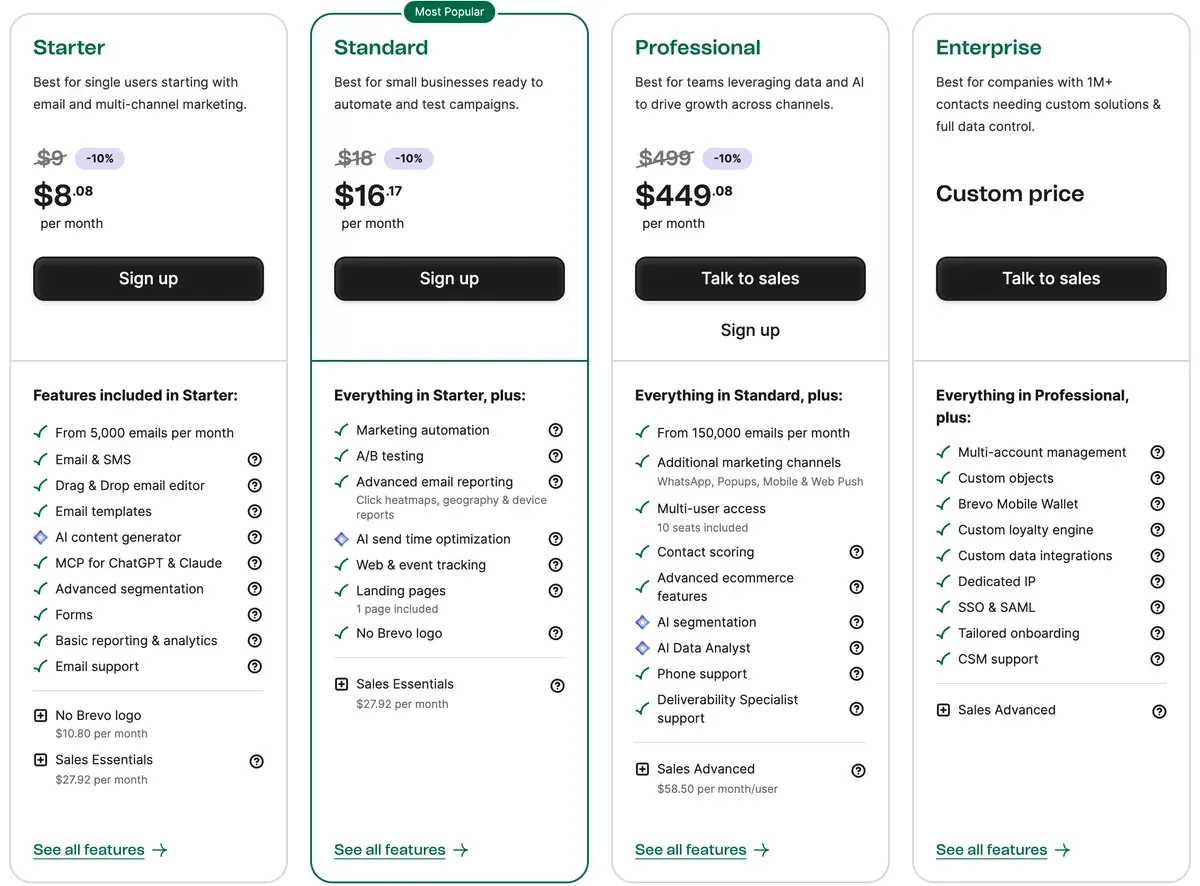
Mailchimp counts contacts, including some you cannot email. Its help centre says “Subscribed, unsubscribed, and non-subscribed contacts are included in your contact count”. Archived, cleaned and deleted contacts are left out. So a list that has shed 2,000 subscribers pays for them until you archive them.
How contacts are counted
Subscribed, unsubscribed, and non-subscribed contacts are included in your contact count.
Archived, cleaned, and deleted contacts don’t count toward your contact total or the price of your marketing plan.
Past a paid plan’s contact or send limit, Mailchimp bills an overage and keeps sending (Mailchimp pricing FAQ).
Free plans: 300 emails a day against 500 a month
Brevo’s Free plan stores up to 100,000 contacts and sends 300 emails a day, with no time limit (Brevo help). That is about 9,000 emails a month. Mailchimp’s Free plan holds 250 contacts and sends 500 emails a month, 250 a day at most (Mailchimp pricing).
A Brevo campaign to more than 300 people reaches 300 that day, and Requeue sends it to the rest on the days after (Brevo help). Mailchimp pauses sending once a Free account passes its contact or send limit.
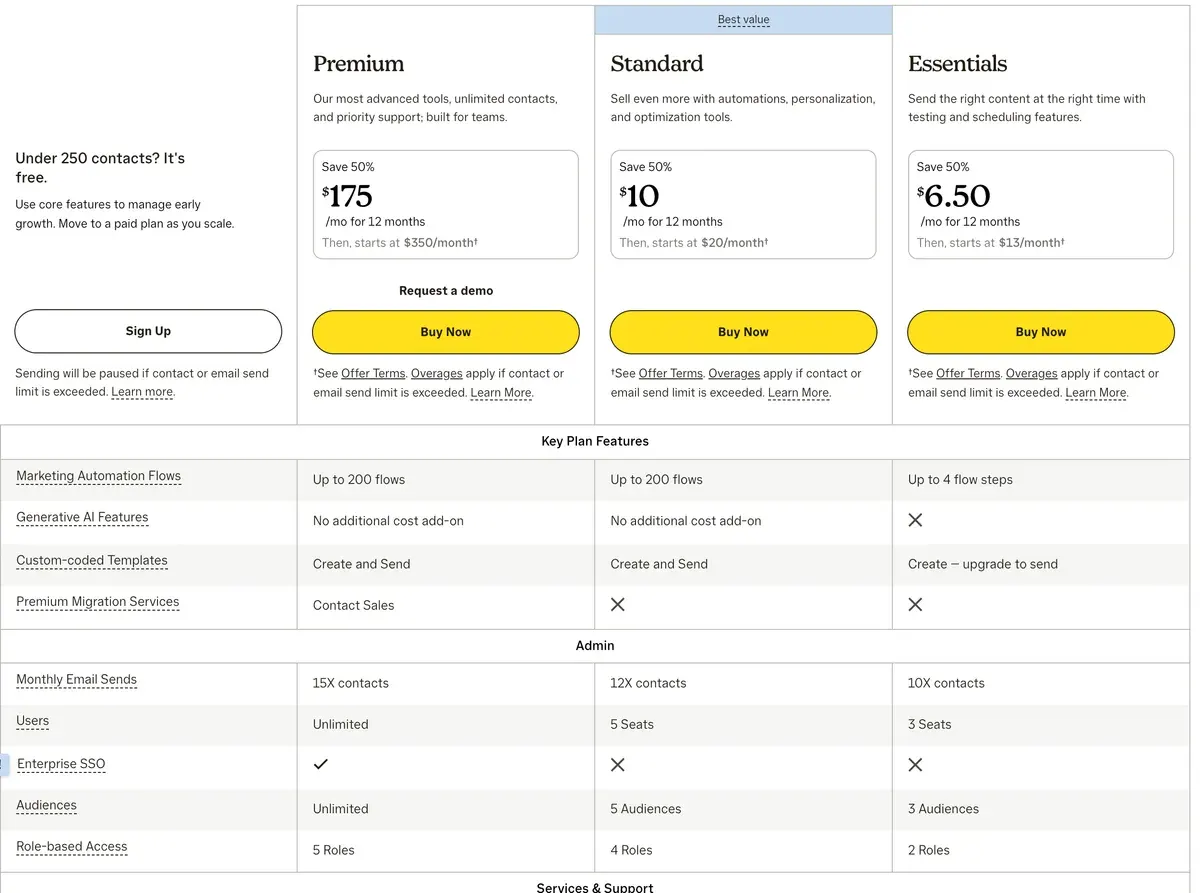
Mailchimp’s grid gives Free no scheduling and no generative AI, with email support for the first 30 days only. Both put their own logo on free emails (Brevo help, Mailchimp pricing).
Automation and AI: which plan has what?
Marketing automation means emails that send themselves when a contact does something, such as a welcome series after sign-up. Brevo allows it on Free and Starter for up to 2,000 contacts, and Standard lifts that cap (Brevo help). Mailchimp Essentials limits a flow to 4 steps, and Standard allows up to 200 flows (Mailchimp pricing).
AI writing starts lower on Brevo. Its AI content generator, which drafts subject lines and email copy, is on Starter at $9 a month (Brevo pricing). Mailchimp’s generative AI features start on Standard at $20 a month, read on (Mailchimp pricing).
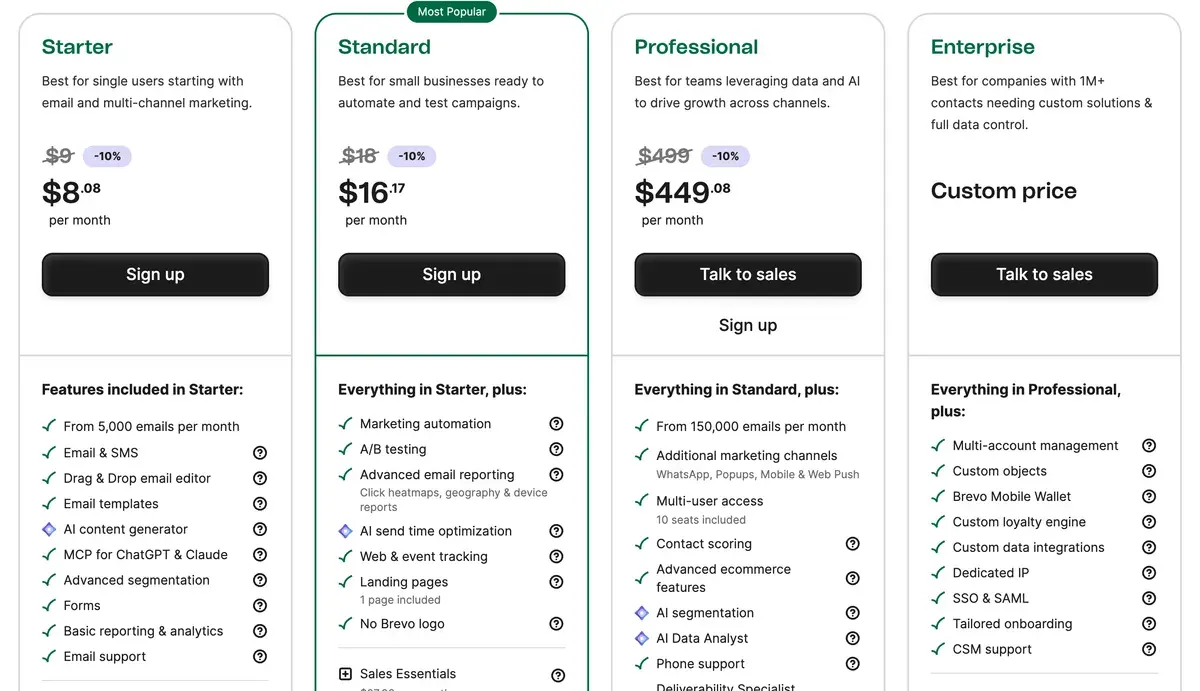
Brevo Standard adds send-time optimisation, which picks the hour each contact tends to open. AI segmentation waits for Professional, from $499 a month (Brevo pricing).
Brevo Starter also lists an MCP connector, the link that lets ChatGPT or Claude work inside your account: Brevo MCP. What each AI feature does across 15 tools: AI features in email tools.
SMS, WhatsApp and transactional email
Brevo sells the extra channels as pay-as-you-go credits. Its plans article lists SMS from the Free plan up and WhatsApp campaigns from Professional. WhatsApp credits never expire (Brevo help).
Mailchimp sells SMS as an add-on to a paid plan, in select markets and after an application. Its credits renew each month and unused ones expire (Mailchimp pricing FAQ).
Transactional email is a message one person triggers, such as a receipt or a password reset. Brevo’s pricing FAQ says every plan includes it, and Free sends it inside the same 300 a day. Set-up is in the Brevo SMTP guide.
On Mailchimp it is an add-on to Standard or Premium, sold in blocks of 25,000 emails. A block costs $20 for the first 20 blocks (Mailchimp Transactional pricing).
Templates and editor
Brevo and Mailchimp both build emails in a drag-and-drop editor. Brevo says a free account opens “over 40 free, fully responsive email templates”, with rich-text and HTML editors beside the visual one (Brevo’s Mailchimp page). Mailchimp’s grid marks pre-built templates “Limited” on Free and included on every paid plan.
Custom-coded templates split the Mailchimp plans: Essentials can create them, and only Standard and Premium can send them. Mailchimp lists “300+ Integrations” on every plan, and Brevo says it connects with “150+ digital tools”.

Does Brevo or Mailchimp train AI on your emails?
Brevo’s terms and Mailchimp’s terms both say yes. Brevo’s terms of use (version 1 October 2025) allow training its AI Features “for the sole purpose of improving the performance of the Services provided to You” (6.7).
Terms of use, 6.7
Brevo may use Content and Usage Data to enrich and train its AI Features for the sole purpose of improving the performance of the Services provided to You, in particular to prevent fraud, phishing and unsolicited electronic communications, and to secure the Services.
Mailchimp’s terms (updated 19 November 2026) go wider: “We may use your Inputs and Outputs, including Customer Data, for machine learning purposes” (section 30). The same section grants Mailchimp, once you use its AI Model, an irrevocable licence to those inputs and outputs. It points to account-setting preferences and does not say they stop training.
Standard Terms of Use, 30
We may use your Inputs and Outputs, including Customer Data, for machine learning purposes in order to develop and improve the AI Model, the Services, and similar products and features, and you instruct us to process Customer Data for such purposes.
Every vendor’s clause side by side: does your email tool train AI?
Moving a list from Mailchimp to Brevo
Brevo has a built-in Mailchimp integration. Its help article (updated 3 November 2026) has you open Integrations, choose Mailchimp and turn on contact synchronisation, then follow these steps:
- Log in to Mailchimp from Brevo and allow Brevo to access the account.
- Select the Mailchimp lists to sync.
- Map each Mailchimp attribute to a Brevo attribute. Only Email is mandatory.
- Select or create the Brevo list that receives the contacts.
- Set how often new contacts sync.
- Confirm that your contacts consented.
- Save to activate. Existing contacts start syncing at once.
Clean the Mailchimp list first. The article says only contacts who consented in the last two years may be imported, and every imported contact arrives as subscribed. It syncs up to 1 million contacts and brings no tags and no address fields.
Emails and automations do not move. Brevo’s Mailchimp page says to rebuild campaigns in its editor and recreate automations by hand.
Support leads Mailchimp’s complaints; Brevo’s readable reviews are few
Mailchimp has 25 readable sources, most of them on Trustpilot. Brevo has 5, all on Reddit.
- Slow or unhelpful support is the most reported Mailchimp problem. It appears in 9 of 25 sources: Trustpilot, Trustpilot.
- Locked accounts and sends held by compliance review come up in 5 of 25 Mailchimp sources: Trustpilot, Trustpilot.
- Mailchimp’s live chat is praised for fast fixes in 3 of 25 sources: Trustpilot, Trustpilot.
- Prices that rise quickly and surcharges come up in 5 of 25 Mailchimp sources: Trustpilot, Trustpilot.
- One Reddit user finds Mailchimp cheaper than Brevo for a basic sign-up and coupon flow (1 of 25 Mailchimp sources: Reddit).
- One Brevo user calls the 300 free emails a day enough for a small company (1 of 5 Brevo sources: Reddit).
- One detailed Brevo post says automation emails count as transactional, so their unsubscribe link blocks only transactional mail (1 of 5 Brevo sources: Reddit).
- Two Brevo post titles raise deliverability and trust concerns, with the post text removed (2 of 5 Brevo sources: Reddit, Reddit).
Is Brevo better than Mailchimp?
On price and the free plan, yes. Brevo costs less at each list size we price, and its Free plan sends about 18 times as many emails a month as Mailchimp’s.
Mailchimp gives three seats on the entry plan against one. Its price holds up to 10 sends per contact a month on Essentials and 12 on Standard.
Who should pick which?
Pick Brevo if you are leaving Mailchimp over the bill, or if your list holds many contacts you rarely email. More on it: Brevo for email marketing and Brevo pricing.
Pick Mailchimp if a small team emails a small list about twice a week. That sits inside Mailchimp’s cap of 10 sends per contact a month on Essentials and 12 on Standard.
Brevo is the wrong pick there: at 2,500 contacts and eight emails each a month, Mailchimp Standard’s $60 beats Brevo Standard’s $69 (Mailchimp pricing). More on it: Mailchimp for email marketing and Mailchimp pricing.
Mailchimp is the wrong pick for a big list mailed once a month. Brevo Starter sends 50,000 emails for $56, against $385 for 50,000 contacts on Mailchimp Essentials (Brevo pricing).
Other routes out of either tool: Brevo alternatives, Mailchimp alternatives, Brevo vs MailerLite and Kit vs Mailchimp. Every tool in the section: AI email marketing.
Questions buyers ask about Brevo and Mailchimp
Is Brevo cheaper than Mailchimp?
Yes, at each of the four list sizes we price, at four emails per contact a month. Mailchimp Standard costs less than Brevo Standard once you send more than six emails per contact a month at 2,500 contacts.
Is Brevo the same as Sendinblue?
Yes. Brevo is the company formerly called Sendinblue, so a Sendinblue vs Mailchimp comparison is this one under the old name.
Which has the bigger free plan, Brevo or Mailchimp?
Brevo. Its Free plan sends 300 emails a day and stores up to 100,000 contacts. Mailchimp Free stops at 250 contacts and 500 emails a month.
More email tool comparisons sit together in the AI email marketing hub
Sources
- Brevo: Brevo pricing, plan cards, AI features by plan, the FAQ line that all plans include transactional email. Checked
- Brevo: Brevo pricing API, Starter and Standard base prices and every email tier, monthly billing, in USD. Checked
- Brevo help centre: FAQs: What are the limits of the Free plan?, updated 9 November 2026; 300 sends a day, 100,000 stored contacts, Requeue, 2,000 contacts in automations, no time limit. Checked
- Brevo help centre: About Brevo’s pricing plans, updated 23 November 2026; features by plan, contacts stored per email tier, WhatsApp campaigns on Professional. Checked
- Brevo: Mailchimp vs. Brevo, Brevo’s own comparison: its price table at one email a month, its template and integration counts, its three switching steps. Checked
- Brevo help centre: Mailchimp integration (by Brevo): import and update your contacts to migrate to Brevo, updated 3 November 2026; the seven set-up steps, the 1 million contact limit, no tags or address fields, the two-year consent rule. Checked
- Brevo help centre: Supported countries and pricing for WhatsApp messages, updated 13 November 2026; WhatsApp credits are an add-on and never expire. Checked
- Brevo: Brevo terms of use, version 1 October 2025; 6.7 on training AI Features. Checked
- Mailchimp: Mailchimp marketing pricing, plan grid (flows, generative AI, seats, send limits, templates, support), SMS and overage FAQs. Checked
- Mailchimp: Mailchimp pricing endpoint, monthly list price for every Essentials and Standard contact tier, in USD. Checked
- Mailchimp help centre: About Mailchimp pricing plans, which contact types count towards the contact total. Checked
- Mailchimp: Mailchimp Transactional Email pricing, blocks of 25,000 emails, price per block, add-on to Standard and Premium. Checked
- Mailchimp: Mailchimp standard terms of use, updated and effective 19 November 2026; section 30 on the AI Model licence and machine learning. Checked

Alexandre S.
Alexandre S. is a creative ad strategist and copywriter with ten years' experience in digital marketing across multiple channels.
Related pages
-
 Profile Brevo email marketing: billed by emails sent, with Aura AI from Starter
Brevo bills by emails sent: 50,000 contacts mailed monthly cost 56 dollars, weekly 249. AI by plan and the clause 6.7 training terms, checked 1 Nov 2026.
-
 Pricing Brevo pricing: Free, Starter, Standard and Professional by emails sent
Brevo Starter starts at 9 dollars for 5,000 emails; past 2,500 contacts the cheapest paid tier is 32. Every tier, the contact cap and the AI plans, 1 Nov 2026.
-
 Alternatives Brevo alternatives: who costs less when you send often
Eight Brevo alternatives priced at 2,500 and 10,000 contacts, with the send count where a flat price beats Brevo’s per-email bill. Checked 24 Nov 2026.
-
 Profile Mailchimp: what it costs at your list size, its AI and its terms
Mailchimp Essentials costs $13 a month for 500 contacts with no AI; Standard adds it at $20. Unsubscribed contacts are billed. Checked 1 Nov 2026.
-
 Pricing Mailchimp pricing: Free, Essentials, Standard and Premium from 500 to 50,000 contacts
Mailchimp Free holds 250 contacts. Essentials costs $13 a month at 500 contacts and $385 at 50,000. Every plan at four list sizes, checked 1 Nov 2026.
-
 Alternatives Mailchimp alternatives: what you save at your list size, and where the AI sits
Eight Mailchimp alternatives priced at 2,500 and 10,000 contacts, with the plan that holds AI and whether each trains on your list. Checked 1 Nov 2026.


