Brevo MCP: how to run campaigns and contacts from Claude or ChatGPT
Brevo MCP lets an AI assistant such as Claude or ChatGPT work inside your Brevo account. MCP (Model Context Protocol) is the standard way AI assistants call outside tools. You ask in plain words, and the assistant reads your campaign results or saves a draft email in Brevo.
The difference that matters is sending. The Claude connector and the ChatGPT plugin read data and create drafts, and Brevo says they never send. The MCP server, connected with a key, can send a campaign.
| Route | How you sign in | What the assistant does | Can it send? | Brevo plan |
|---|---|---|---|---|
| Claude connector | Brevo login inside Claude, no key | Reads campaigns, contacts and segments; saves email, SMS and template drafts | No | All plans |
| ChatGPT plugin | Brevo login inside ChatGPT, no key | The same, plus a test send of a template | No, except a test send of a template | All plans |
| MCP server, direct | Brevo login (OAuth) or an MCP key | Every tool in 27 modules, CRM deals and WhatsApp included | Yes, with an MCP key | The developer page names no plan; the pricing page lists “MCP for ChatGPT & Claude” from Starter |
Scroll sideways for all 5 columns
Brevo’s help articles for Claude and ChatGPT put both on every plan, Free included. Its pricing page lists “MCP for ChatGPT & Claude” from Starter, at $9 a month, read on .

What can Brevo’s MCP server do, and what can it not?
Brevo’s MCP server gives an assistant tools in 27 modules. The developer docs list email (campaigns, analytics, templates), audience (contacts, lists, segments, import) and sales (deals, tasks and pipelines in Brevo’s CRM).
The connector and the plugin use a small part of that. Both read campaigns, A/B test results, contacts and segments, and both save drafts. Neither can edit a contact, send, schedule or delete anything.
Why it works
The ChatGPT plugin Reads campaign and A/B results, contacts and segments. Creates HTML templates and email and SMS drafts. Never sends, schedules or deletes. No key needed, all Brevo plans.
The Claude connector Same scope as the plugin: analyze campaigns, look up contacts, explore segments, save drafts to review. Never sends, schedules or deletes. All Brevo plans.
The MCP server for the rest The MCP server has tools for sending campaigns, sending transactional email and creating CRM deals, and it needs an MCP token. It has full read and write access, so store the token like a password.
No route reads incoming customer messages. Brevo’s email MCP page says no tool lists or reads new conversations.
How to connect Brevo to Claude
The connector installs from Claude’s directory. Brevo says a free Claude account is enough.
- In Claude, click “Customize”, then go to Connectors.
- Type brevo in the search bar and select the Brevo connector.
- Log in to your Brevo account.
- Review the permissions and click “Authorize”.
For all 27 modules, add the full server as a custom connector in Claude Desktop: Settings, Connectors, Add, “Add custom connector”. Enter https://mcp.brevo.com/v1/brevo/mcp and sign in with Brevo. No key is needed. This server has the sending tools, so read the safety section first.
How to connect Brevo to ChatGPT
- Log in to ChatGPT and to Brevo.
- Open the left sidebar and click Plugins, then “Browse plugins”.
- Search for Brevo, select the plugin and click “Install plugin”.
- Click “Sign in with Brevo”, then “Authorize”.
- In a new chat, click the + icon and pick Brevo.
The full server needs a custom MCP server in ChatGPT with the same URL, which Brevo’s docs say is open to Business, Enterprise and Edu workspaces.
Claude Code, Cursor and other coding tools need an MCP key
Coding tools connect with an MCP key, a password the assistant sends with each request. In Brevo, open Settings, “SMTP & API”, “API Keys & MCP”, generate an API key and switch on “Create MCP server API key”. Brevo shows the key once.
For Claude Code, Brevo gives one command:
claude mcp add --transport http --scope user brevo https://mcp.brevo.com/v1/brevo/mcp \
  --header "Authorization: Bearer paste-your-mcp-key-here"
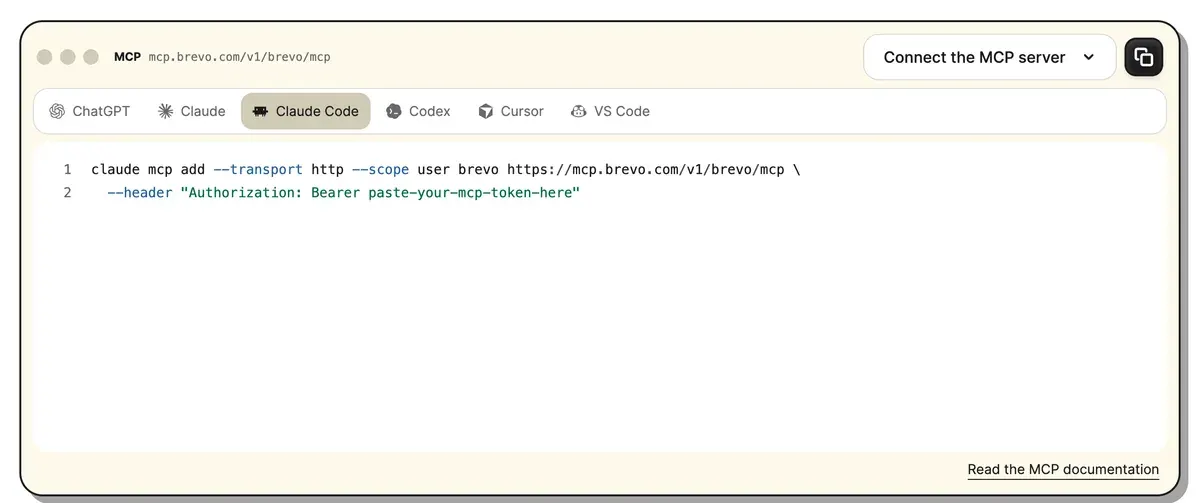
Cursor, Codex, VS Code and Cline use the same URL and key.
Three marketing prompts and what the server does
| Job | Brevo’s example prompt | What happens |
|---|---|---|
| Draft a campaign | “Draft an email campaign for our summer sale targeting my Newsletter subscribers list.” | Claude saves a draft in Brevo and names its subject line and list. You send it from Brevo |
| Pull statistics | “How did my last 5 email campaigns perform?” | The assistant reads the results. Brevo advises naming a time range |
| Add contacts | “Add a contact to my newsletter list” | The connector and plugin cannot. The full server has contacts and import modules |
Scroll sideways for all 3 columns

What can an assistant send without your approval?
Through the connector or the plugin, nothing: every draft waits in Brevo for you to send, apart from a template test send in ChatGPT.
Brevo’s developer docs say an MCP key “grants full read and write access to your account”, so an assistant can send a campaign.
Brevo MCP
Get your MCP key Click Generate a new API key and turn on Create MCP server API key.
Copy and store the key Copy the key immediately and store it securely. It grants full read and write access to your account.
Available servers Connect to the main server for access to all features, or to individual servers for specific needs. Individual servers give your AI assistant a smaller, more focused set of tools, which can improve response quality.
Two settings narrow that:
- Restrict the key. Brevo’s key permissions set each resource to None, Read or All.
- Connect a smaller server.
/v1/brevo_campaign_analytics/mcpcarries the reporting tools only.
The custom connector in Claude Desktop reaches the full server with your Brevo login and no key, so a key restriction does not apply. Brevo’s docs do not say what that login can send. Limit it with a smaller server.
Brevo says the directory connector ignores each user’s own Brevo permissions, so a teammate with a limited login sees through Claude whatever the connection sees.
On training, Brevo says Anthropic does not train its models on connector data unless you opt in. Brevo’s own terms (clause 6.7) say it “may use Content and Usage Data to enrich and train its AI Features”. Does your email tool train AI on your data compares 15 tools.
Brevo AI: what is built in, by plan
Separate from MCP, Brevo’s built-in AI starts with the content generator on Starter. Standard, at $18 a month, adds send time optimisation. Professional, at $499 a month, adds AI segmentation and the Data Analyst. Our guide to AI features in email tools compares them.
Other email tools with an MCP server
| Tool | MCP access |
|---|---|
| beehiiv | Read on Free, write from Lite |
| Kit | “AI Connectors”, 65+ tools, Creator plan |
| MailerLite | Claude and ChatGPT server, limited on Free |
| Klaviyo | Remote server and ChatGPT app for account data |
| Omnisend | Reads account data, creates campaigns |
| lemlist | MCP and command-line tool, Email plan |
| Smartlead | 116+ tools for ChatGPT, Claude and Grok |
| SoftSync | Every paid plan, with a read-only mode |
Scroll sideways for all 2 columns
For pipelines, see our CRM MCP guide; for apps with no server, Zapier MCP.
When Brevo MCP is the wrong pick
It is the wrong pick when you want the assistant to answer customers, because no tool reads their new messages. It is also wrong on a personal ChatGPT plan if you want more than drafts, since custom MCP servers need a Business, Enterprise or Edu workspace. For a creator newsletter, Kit lists AI Connectors on its Creator plan at $39 a month, on Kit’s pricing page read on .
Questions about Brevo MCP
Is Brevo MCP free?
Yes for the Claude connector and the ChatGPT plugin, on all plans. For the MCP server, the pricing page lists it from Starter.
What is the Brevo MCP server URL?
https://mcp.brevo.com/v1/brevo/mcp for the full server. Smaller servers follow the pattern /v1/brevo_contacts/mcp.
Can Claude send a Brevo campaign?
Through the directory connector, no: you send from Brevo. Through the full server with a full-access MCP key, yes.
Every AI email marketing page, sorted by job, is in the AI email marketing hub
Sources
- Brevo Developers: Brevo MCP, The marketplace route and the direct route, the endpoint mcp.brevo.com/v1/brevo/mcp, OAuth 2.1 sign-in or a Bearer key, the Claude Desktop, ChatGPT, Claude Code and Cursor steps, the individual servers and the line that custom MCP servers in ChatGPT need a Business, Enterprise or Edu workspace. Checked
- Brevo: Email MCP server, The plugin and connector never send, schedule or delete and work on all Brevo plans; the MCP server with a key can send campaigns and transactional email; 27 modules; no tool reads new inbox conversations. Checked
- Brevo Help Center: Brevo connector for Claude, Plan availability, the read, draft and send table, the six set-up steps, the example prompts, the draft summary Claude returns, the user-permissions limitation and the data and training answers; read through the help centre’s public article API. Checked
- Brevo Help Center: Brevo plugin for ChatGPT, The read, draft and send table with the template test send, the install steps, web, desktop and mobile support, and the answer that the plugin is free on all Brevo plans. Checked
- Brevo Help Center: What is Model Context Protocol (MCP)?, The MCP API key as a version of a standard API key bound by that key’s permissions, the key shown once, and the main server’s 27 modules. Checked
- Brevo Help Center: Create and manage your API keys, The menu path Settings, SMTP & API, API Keys & MCP, the Create MCP server API key switch, and Restricted or Full access. Checked
- Brevo Help Center: About API key permissions, Restricted keys start every resource at None; Email campaigns and Contacts offer None, Read and All; a blocked call returns Access denied for resource. Checked
- Brevo: Brevo pricing, The feature MCP for ChatGPT and Claude, the AI content generator, AI send time optimisation, AI segmentation and the AI Data Analyst, with the plan each sits on. Checked
- Brevo: Brevo terms of use, Clause 6.7 on training Brevo’s AI Features with Content and Usage Data, version of 1 October 2025. Checked
- Kit: Kit pricing, The Creator plan price and its AI Connectors (MCP) line. Checked

Alexandre S.
Alexandre S. is a creative ad strategist and copywriter with ten years' experience in digital marketing across multiple channels.
Related pages
-
 Profile Brevo email marketing: billed by emails sent, with Aura AI from Starter
Brevo bills by emails sent: 50,000 contacts mailed monthly cost 56 dollars, weekly 249. AI by plan and the clause 6.7 training terms, checked 1 Nov 2026.
-
 Pricing Brevo pricing: Free, Starter, Standard and Professional by emails sent
Brevo Starter starts at 9 dollars for 5,000 emails; past 2,500 contacts the cheapest paid tier is 32. Every tier, the contact cap and the AI plans, 1 Nov 2026.
-
 Guide Brevo CRM: free limits and what each sales seat costs
Brevo’s CRM is free up to 50 open deals and one pipeline. Paid sales seats sit on top of an email plan: the monthly bill for 1 to 6 users, read 24 Nov 2026.
-
 Guide Brevo coupon code
BREVOFRIDAY2026 takes 30% off a first annual year of Brevo Starter or Standard until 30 Nov 2026. The real saving against yearly billing, and what stays after.


