Google Ads MCP: how to connect Google’s server to Claude
Google has an official Google Ads MCP server. MCP (Model Context Protocol) is the standard that lets an AI assistant use another service’s tools. This server lets Claude query your ad account in plain English. Google publishes the code on GitHub, and you run it yourself.
Two recent changes alter the setup. Google ended developer tokens on 9 September 2026, so you now need a Google Cloud project with API access. And Google’s developer page, last updated 30 October 2026, calls the server “strictly read-only”, while the repository’s 0.0.6 release of 2 November 2026 adds four write tools.
If you want a route that drafts changes and needs no Python, Creatify sells one as a Google Ads Agent.
| Route | Price | What it does | Setup |
|---|---|---|---|
| Google’s MCP server | No price on its pages | Reads through queries; writes assets and labels with a confirm step | Python, Cloud project, OAuth |
| Ads Advisor and Recommendations | Free inside Google Ads | Suggests negatives, budgets and assets | None |
| Pipeboard | Free for 30 tool runs a week; Pro $29.90 a month | A hosted server; Google Ads takes one account slot | Sign-in |
| Creatify Google Ads Agent | Connecting is free; runs on credits (10 free a month, paid plans from $15 a month) | Reads the account, drafts changes for approval, makes the ad | Google sign-in |
Scroll sideways for all 4 columns

Is the Google Ads MCP server read-only?
By default it is not, despite the sentence on Google’s page.
Google Ads MCP server
Read-only. This implementation is strictly read-only. It cannot modify bids, pause campaigns, or create new assets.
The README lists seven tools, and three of them read: search, get_resource_metadata and list_accessible_customers.
The other four write: create_asset, upload_video_asset, manage_labels and manage_label_associations. Each one uses a step Google calls Propose and Confirm. The tool first returns a description of the change and a checksum, a code tied to that exact request. It runs only when that code comes back after your approval.
None of the seven can change a bid, pause a campaign or edit a budget. To lock the server to reading, set labels: false and assets: false in tools_config.yaml.
What access does the server need?
You need a Google Cloud project with Google Ads API access, an OAuth sign-in and a Google login that can see the account. OAuth is the “sign in with Google” window. Google’s token page says “We sunset developer tokens on September 9, 2026”, and that access levels are now “granted to your Google Cloud Console project”.
| Level | Reaches | Operations a day | How you get it |
|---|---|---|---|
| Test | Test accounts only | 15,000 | Automatic when you enable the API |
| Explorer | Test and production | 2,880 on production | Apply on the API Overview page |
| Basic | Test and production | 15,000 | Apply from Explorer, after brand verification |
| Standard | Test and production | Unlimited | Apply from Basic; a manual audit of about 10 business days |
Scroll sideways for all 4 columns
Explorer allows 2,880 production operations a day, which covers a single account’s reports. Google’s server page asks for Explorer, Basic or Standard, so a project on Test cannot read a real account.
Mind a fault Google lists: some projects upgraded after 9 September get AUTHORIZATION_ERROR on production calls. Google calls a new Cloud project with a fresh Explorer application a temporary workaround while its fix rolls out.
How to connect Google Ads to Claude
These steps follow Google’s README, for Claude Code. The server runs on your own machine.
- Install pipx, the tool that runs the server, and Google’s gcloud command-line tool, which handles the sign-in.
- In a Google Cloud project, enable the Google Ads API, then apply for Explorer on the API Overview page.
- Create an OAuth client. Add the scope
https://www.googleapis.com/auth/adwordsto the consent screen, and add yourself as a test user if it shows Testing. In Testing, Google’s audience rules let only listed test users sign in, and each sign-in expires after seven days. - Sign in, then copy the credentials path it prints:
gcloud auth application-default login \
  --scopes https://www.googleapis.com/auth/adwords,https://www.googleapis.com/auth/cloud-platform \
  --client-id-file=YOUR_CLIENT_JSON_FILE
- Add the server under
mcpServersin~/.claude.json, or in a project’s.mcp.json. Google’s README names~/.claude/settings.json, while Claude Code’s MCP docs name these two:
{
  "mcpServers": {
    "google-ads-mcp": {
      "command": "pipx",
      "args": ["run", "--spec", "git+https://github.com/googleads/google-ads-mcp.git", "google-ads-mcp"],
      "env": {
        "GOOGLE_PROJECT_ID": "YOUR_PROJECT_ID",
        "GOOGLE_APPLICATION_CREDENTIALS": "/path/to/credentials.json"
      }
    }
  }
}
- Working through a manager account (MCC)? Add
GOOGLE_ADS_LOGIN_CUSTOMER_IDto the sameenvblock. - Restart, then ask Claude to list your accessible customers.
Claude on the web takes a longer road. A custom connector needs a server address on the internet, so you host this one on Cloud Run with an OAuth client. Google warns against deploying with --allow-unauthenticated without that client, since anyone could then use the container’s account.
One safety step costs nothing. The adwords scope covers reads and changes alike, so the read-only limit lives in the tool list. Sign in with a Google login whose Ads role is Read-only, and Google’s access rules stop campaign edits at the account itself.
What can the server read?
It reads anything GAQL can reach. GAQL (Google Ads Query Language) is Google’s reporting language, and Claude writes it for you. Campaigns, search terms, budgets, statuses and change history are all in reach through the search tool.
Use the Google Ads server. For the last 30 days, list search terms with spend and no conversions.
Sort by spend, show the top 50, and give spend in my account currency. Change nothing.
Check the money in the answer. The API returns amounts in micros, and Google’s reference sets one million micros to one unit of your currency. Ask Claude to show one conversion before you trust a table.
Your account data also goes to the model. The README says the server “will expose your data to the Agent or LLM that you connect to it”, which matters for client accounts.
Three jobs to hand over, three to keep
Reading is where this server earns its setup. Anything that moves money stays with you, and the server’s tools cannot do it anyway.
| Job | Who does it | Why |
|---|---|---|
| Sweep search terms for spend with no conversions | Assistant | A long, repetitive read across every ad group |
| Split lost impression share into budget and rank | Assistant | One query answers “do I need money or better ads?” |
| Explain a jump in cost per sale from change history | Assistant | It lines up every edit with its date across the account |
| Add negative keywords | You | A broad negative can block terms that convert |
| Raise budgets | You | Creatify flags raises above 20 per cent, since a big swing makes Smart Bidding re-learn |
| Change keyword bids | You | Under target CPA or target ROAS, the strategy ignores them |
Scroll sideways for all 3 columns
Smart Bidding is Google’s automatic bidding. A negative keyword tells Google not to show your ad for a search.
Creatify’s Google Ads Agent drafts the changes for you
Creatify’s Google Ads Agent is a route for people who want the second half of that table done with a yes. Its pricing page lists Ad Agent for Meta, TikTok and AppLovin with no mention of Google, so check your plan with Creatify before you pay.
You sign in with Google, and owners or admins of your Creatify workspace pick the accounts, manager accounts included. It works through the official Google Ads API.
It reads search terms, impression share, Quality Score, auction insights and 30 days of change history. Every pause, budget, keyword or negative then shows on a card with the values before and after, and it runs after you approve. Cards you ignore expire after 72 hours. It never deletes.
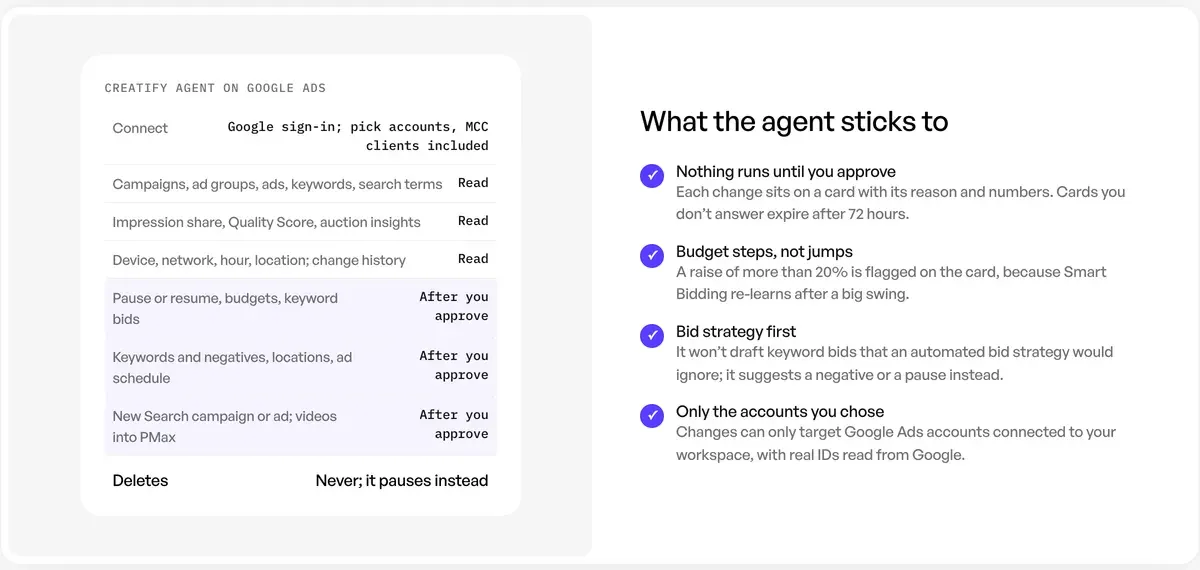
Three limits sit on Creatify’s own page. It creates Search campaigns and adds new ads to existing ad groups, and it does not create Performance Max campaigns. It won’t draft keyword bids under “Maximize conversions”, target CPA or target ROAS. And scheduled routines “ask before acting unless you choose otherwise”, so leave that alone.
Creatify prices no action: the agent “runs on credits”. Users report that credits go faster than the pricing suggests, and name agent runs among the causes (15 of 61 sources: Trustpilot, Reddit).
Creatify is the wrong pick for a Search-only account with no video plans. Creatify itself says Google’s Recommendations and Ads Advisor overlap with its agent and are “free inside Google Ads”.
By its own account, the agent adds three things. It reads Google beside your other ad accounts, explains changes from your history and makes new ads in the same chat. AI media buyers compares the wider field.
Where video fits: Performance Max, Demand Gen and YouTube
Video is where Creatify’s agent goes past Google’s server. It can make a video and add it to an existing Performance Max asset group after you approve. Performance Max is Google’s all-channel campaign, and an asset group is its bundle of ads.
Its page does not mention Demand Gen or YouTube campaigns. For those, make the file in Creatify and carry it across yourself. Demand Gen is Google’s campaign for visual ads on YouTube, Discover and Gmail, and its video rules are firm:
- Videos must already be on YouTube. “You can’t upload an offline video”, though an unlisted video works.
- The minimum is 5 seconds, and “Videos shorter than 10 seconds won’t serve on YouTube In-stream.”
- Each ad takes 1 to 5 videos, and Google recommends 1080 by 1920 for YouTube Shorts.
Google’s server now helps with the middle step. In local mode, upload_video_asset sends a video file to YouTube, and create_asset registers it as an asset, each behind the confirm step. The tool list has no way to attach that asset to a campaign, so you finish in Google Ads.
Making a video ad in Claude or ChatGPT gets you the file from a chat. YouTube Shorts ads covers the format.
Questions about the Google Ads MCP server
Do I still need a developer token for the Google Ads MCP?
No. Google ended developer tokens on 9 September 2026. Access now follows the Google Cloud project behind your OAuth sign-in.
Is the Google Ads MCP server free?
Neither Google page names a price. You run the code yourself, and Cloud Run hosting bills through your Google Cloud account.
Can the Google Ads MCP pause a campaign or change a budget?
No. The README’s seven tools run queries and handle assets, labels and video uploads. None of them changes a bid, a campaign’s status or a budget.
Does it work with the Claude app as well as Claude Code?
Yes, with more work. Claude Code runs it locally from a config file. The Claude web app needs the server hosted on the internet with an OAuth client.
Can one setup reach several client accounts?
Yes. Set GOOGLE_ADS_LOGIN_CUSTOMER_ID to your manager account, and the server reaches the accounts under it that your login can see.
More pages for Creatify users, sorted by job, in the Creatify hub
Sources
- Google for Developers: Google Ads MCP server, Calls the server strictly read-only, lists prerequisites, transports and setup; last updated 30 October 2026. Checked
- Google Ads on GitHub: google-ads-mcp README, Seven tools, four of them write tools, the Propose and Confirm step, the read-only setting and client configuration. Checked
- Google Ads on GitHub: google-ads-mcp releases, Version 0.0.6, 2 November 2026, adds asset and label management. Checked
- Google for Developers: Developer token, Tokens ended on 9 September 2026; access levels moved to the Google Cloud project; the AUTHORIZATION_ERROR fault. Checked
- Google for Developers: Access levels and permissible use, Test, Explorer, Basic and Standard, with daily limits. Checked
- Google Ads Help: About access levels in your Google Ads account, Read-only users cannot edit campaigns. Checked
- Google for Developers: CampaignBudget, Amounts come in micros of the account currency. Checked
- Google Ads Help: About video assets specifications for Demand Gen campaigns, Ratios, length limits, YouTube hosting and placements. Checked
- Creatify: Google Ads Agent, What it reads, approval cards, campaign types, credits, the overlap with Google’s free tools. Checked
- Creatify: Creatify pricing, The comparison table names Meta, TikTok and AppLovin for Ad Agent. Checked
- Pipeboard: Pipeboard pricing, Plans and slots; Google Ads counts as a slot. Checked
- Claude Help Center: Get started with custom connectors using remote MCP, How a remote server is added to Claude. Checked
- Claude Code docs: Connect Claude Code to tools via MCP, MCP servers live in ~/.claude.json or a project’s .mcp.json. Checked
- Google Cloud Platform Console Help: Manage App Audience, In Testing, only listed test users can sign in, and authorisations expire after seven days. Checked
- Trustpilot, Reddit, G2 and Product Hunt: Creatify user reports, 61 public sources synthesised, checked 28 September 2026. Checked

Alexandre S.
Alexandre S. is a creative ad strategist and copywriter with ten years' experience in digital marketing across multiple channels.
Related pages
-
 Profile Creatify for UGC ads
Creatify bills avatar video in 15-second blocks, so a 30-second ad uses 10 credits. Its ad terms and 20 latest Trustpilot reviews, read 24 September 2026.
-
 Guide AI media buyer
An AI media buyer launches, budgets and pauses ads. What Creatify, Madgicx, Meta, Google and Zeely document, and who carries the loss. Checked 6 November 2026.
-
 Guide How to connect Claude to Meta Ads
Add Meta’s connector to Claude in six steps, see what each route can change in your account, and which actions to keep behind a yes. Checked 7 November 2026.
-
 Pricing Creatify pricing
Creatify Standard gives 55 credits a month and a 30-second avatar ad uses 10. The plan that covers 10, 50 or 200 ads a month, prices checked 16 October 2026.


