How to remove the Opus Clip watermark
Upgrade to any paid plan: OpusClip then removes its logo from your earlier Free and trial projects automatically (OpusClip watermark help). The cheapest is Starter at $15 a month. The logo appears on every clip made on the Free plan or during the 7-day Pro trial.

Which OpusClip plans have a watermark?
The Free plan and the free trial add the logo. The help centre names both.
How can I remove the OpusClip watermark?
Where it appears If you are on the Free Trial or Free Plan, you will see an OpusClip brand logo watermark on your clips.
The fix If you upgrade to a paid plan, the watermarks will be automatically removed from your Free Plan/Free Trial projects.
| Plan | Watermark | Price (USD a month) | Credits a month | Catch |
|---|---|---|---|---|
| Free | Yes | Free | 60 | Clips stop being exportable after 3 days; personal use only |
| 7-day Pro trial | Yes | Free | Not stated | No posting or scheduling; no bulk download |
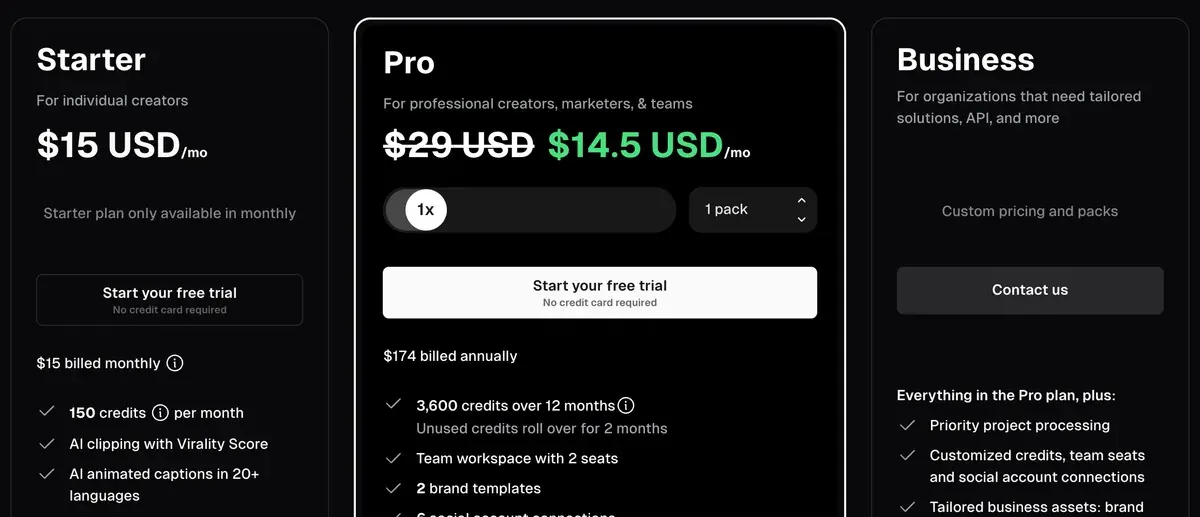
| Starter | No | $15 | 150 | Monthly billing only; 9:16 only |
| Pro | No | $29 | 300 | 4K export; yearly billing available |
Scroll sideways for all 5 columns
A credit is one minute of the video you upload. The OpusClip pricing page lists every plan, and OpusClip pricing works out what each clip costs.
The cheapest clean way to export OpusClip clips
One month of Starter is the lowest price for clean clips. Starter costs $15 a month for 150 credits, enough to process two and a half hours of source video.
OpusClip’s help centre counts 23 to 32 clips from a 30 to 60 minute video. At that count, 60 credits make 23 to 32 clips, so a clip costs about $0.19 to $0.26 on Starter. The month’s 150 credits cover about 57 to 80 clean clips.
Starter suits vertical clips only. If you need 16:9 or square clips, or 4K, Pro starts at $29 a month billed monthly, or $14.50 a month billed yearly billed yearly.
Plans renew by themselves and fees already paid are not refunded. If one month is all you need, cancel in account settings before the renewal date.
How to re-export OpusClip clips without the watermark
The order matters because free clips expire. The Free card on the pricing page says: “After 3 days, the clips will no longer be exportable.”
- Upgrade to Starter or Pro from the OpusClip pricing page within 3 days of making the free project, the export window the Free card gives.
- Open the project. The help centre says the watermark is “automatically removed from your Free Plan/Free Trial projects”.
- Download each clip. OpusClip lists four places: the results page on hover, the clip’s detail view and Export in the editor (download help). Bulk download is the fourth, on Pro only.
- The help article does not say whether a free project past its 3-day limit becomes exportable again after an upgrade. If it does not open, upload the source again; processing it a second time spends credits.
Check the first file before downloading the batch. Clips made after the upgrade come out clean from the start.

Why a third-party watermark remover is a bad deal
A remover changes the pixels. It leaves the licence where it was.
OpusClip’s terms limit Free users to “your own internal, personal, non-commercial use”, and grant commercial use only to “a user of Paid Services” (section “OpusClip Account”, effective 17 November 2025). A free clip with the logo cut out is still a personal-use clip, so posting it for a client or a brand breaks the terms.
OpusClip Account and Rights You Grant
Commercial use You will only use the Services for your own internal, personal, non-commercial use, and not on behalf of or for the benefit of any third party ... if you are a user of Paid Services, you are licensed to use the Services for commercial uses and otherwise to the fullest extent possible under applicable law.
Your uploads This is a license only – your ownership in User Submissions is not affected.
The clip loses quality as well: a remover crops or paints over the corner, then saves the file again.
Does Agent Opus have a watermark?
Agent Opus, OpusClip’s video generator, marks free videos differently. Its FAQ says: “Free-plan downloads include an Agent Opus watermark that appears periodically in the video.”
Pro lists “Watermark removal” on the Agent Opus pricing page, at $29 a month billed monthly. Agent Opus covers its plans and what each video costs in credits.
Klap, the per-clip alternative with no watermark
Klap has no free downloads at all. Its free try turns one video into clips you can preview and edit, and downloading needs a paid plan.
Klap’s pricing FAQ says clips on a paid plan “carry no Klap branding” (Klap pricing). Basic is $29 a month for 100 clips.
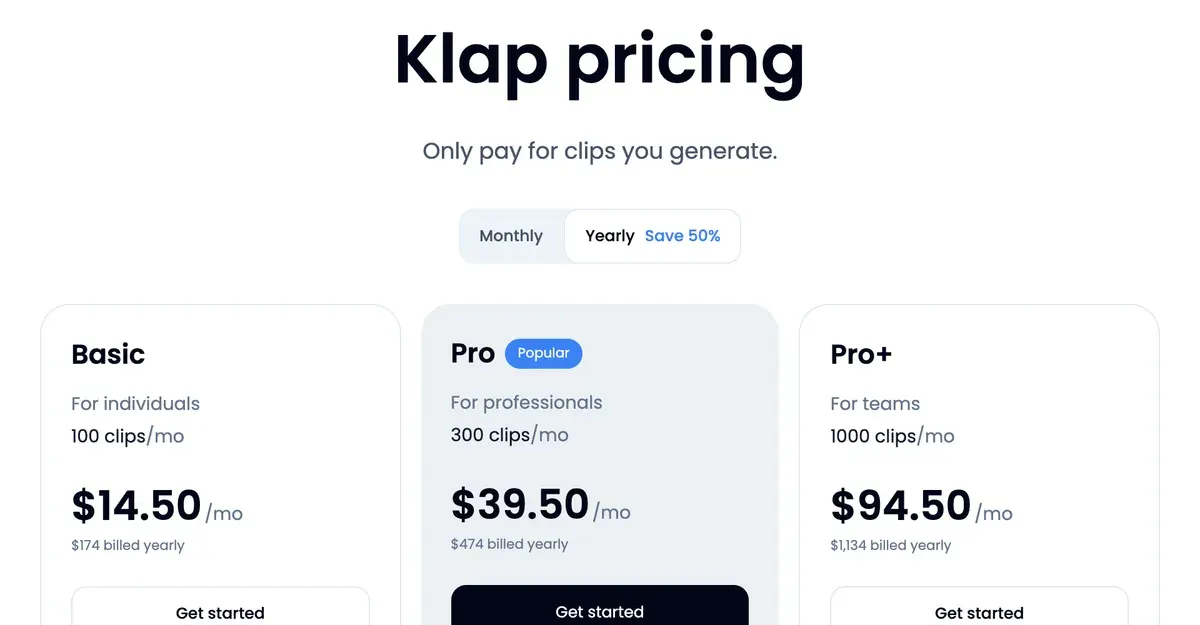
The difference is the billing unit. Klap counts finished clips, whatever the source length; OpusClip counts source minutes. Klap vs Opus Clip sets the two side by side, and the Klap promo code takes 30% off the first payment.
OpusClip watermark questions, answered in a line
Does OpusClip have a watermark?
On the Free plan and the 7-day Pro trial, yes. Paid plans export without it.
How do I remove the OpusClip watermark?
Upgrade to Starter or Pro. OpusClip removes the logo from your free and trial projects automatically.
Can I download OpusClip clips without a watermark for free?
No. Free and trial exports carry the logo, and free clips are for personal, non-commercial use.
Do I need to re-upload my video after upgrading?
Not for projects under 3 days old. An older free project may need the source uploaded again.
Is the OpusClip watermark on the trial too?
Yes. The help centre names the Free Trial and the Free Plan.
How do I remove the Agent Opus watermark?
Upgrade to Agent Opus Pro, which lists watermark removal.
Sources
- OpusClip help centre: Watermark, Free Trial and Free Plan clips carry the OpusClip logo; upgrading removes it from those projects automatically. Checked
- OpusClip: OpusClip pricing, Free card lists a watermark and clips that stop being exportable after 3 days; Starter is monthly only. Checked
- OpusClip help centre: Download and post in 4K, the four places a clip downloads from, and 4K export by plan. Checked
- Opusclip Inc.: OpusClip Terms of Service, effective 17 November 2025; sections OpusClip Account, Content on the Services, Your Rights in the Services and Auto-Renewal for Paid Services. Checked
- OpusClip help centre: Agent Opus FAQ, free-plan downloads carry an Agent Opus watermark that appears periodically. Checked
- Klap: Klap Terms of Service, last updated 25 July 2024; no watermark, branding or labelling clause. Checked

Alexandre S.
Alexandre S. is a creative ad strategist and copywriter with ten years' experience in digital marketing across multiple channels.
Related pages
-
 Alternatives Opus Clip alternatives
Seven tools that could replace OpusClip, compared on price per source minute or per clip, free plans for ads and commercial rights, read 16 November 2026.
-
 Best list AI clipping tools
Eight AI clipping tools for podcasts and streams, compared on cost per minute or per clip, free plans, longest video and ad rights, read 16 November 2026.
-
 Guide How to use OpusClip
OpusClip spends 1 credit per minute of source video. Ten steps from upload to post, ClipAnything prompts that find one moment, and what each step costs.
-
 Profile Klap AI video clipping
Klap AI cuts long videos into captioned vertical shorts and bills per clip: $29 a month buys 100 on Basic. Plans, API and user reports, checked 16 Nov 2026.


