How to use OpusClip
OpusClip is a web app that cuts a long video into short vertical clips with captions. It runs on credits, and 1 credit is 1 minute of the video you upload, however many clips come out (credit article).
To find one specific moment, pick the ClipAnything model and type a prompt that names who is on screen and what they do. Trim the video to the part you need before you submit, because the trimmed minutes are the ones you pay for.
| Step | Credits |
|---|---|
| Process a 60-minute video | 60 |
| Process only minutes 20 to 50 of it | 30 |
| Post or schedule one clip to one X account | 3 |
| Post to YouTube, TikTok, Instagram and the rest | 0 |
| Delete a project after processing | 0 back |
| Refund a project on Pro before any download | All back |
Scroll sideways for all 2 columns
The credit article names two charges, processing and X posts.

Step 1: Start on the free trial
New accounts get a Pro trial that turns into the Free plan after 7 days (trial article). The Free plan gives 60 credits a month and needs no credit card (pricing page).
Use the trial for the prompt steps below, as “Prompt to clip” is a Pro and Business feature. Trial clips carry the watermark, and the trial cannot post or bulk download (trial article).
Step 2: Add the video and trim it
Paste a YouTube link or upload a file.
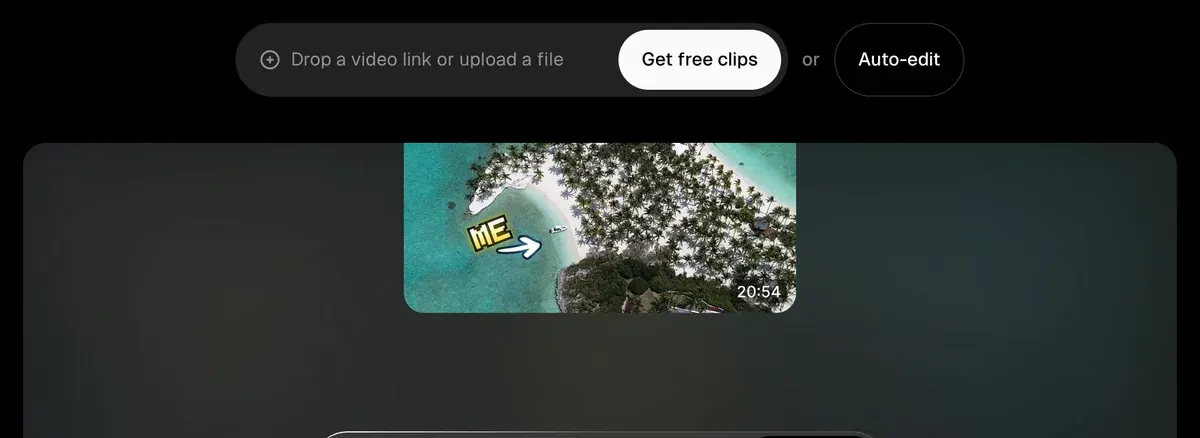
Then move the “Processing timeframe” slider. A 90-minute webinar trimmed to its 20-minute demo costs 20 credits, against 90.
How are credits consumed?
Base rate Processing clips will cost 1 credit per minute of the original video imported.
Rounding Videos under one minute are rounded up to the nearest minute; partial minutes are rounded down to the nearest whole minute.
Processing timeframe Select just the part you want by adjusting the Processing timeframe slider.
X posting Each X post or schedule is charged at 3 credits per clip, per X account.
Step 3: Choose ClipAnything or ClipBasic
ClipBasic reads only the transcript, so its prompt must be a keyword someone says in the video. ClipAnything also reads the picture and the sound: faces, objects, on-screen text, laughter (comparison article).
OpusClip’s how-to advises ClipAnything for videos with little talking.
How to use ClipAnything?
1 Add your video: drop a video link or upload a file.
2 Choose the model: select ClipAnything under Clip model.
3 Pick a genre (optional).
4 Write a prompt (optional): describe the moment you want.
5 Choose captions: pick a style from Quick Presets, or No Caption.
Step 4: Set the genre and clip length
The genre is optional. The clip length defaults to Auto, 0 to 3 minutes (clip length article). Set length here, because a prompt cannot. For Reels and Shorts, choose 0 to 1 minute.
OpusClip’s own tutorial shows these settings from 0:44.

Step 5: Write a prompt that finds the moment
A ClipAnything prompt is a plain sentence describing the moment. The manual gives five things to name: the subject, its look, the action, the feeling and any sound.
| You want | Prompt |
|---|---|
| A product shot from a demo | Show me the host holding the blue bottle and reading the label |
| A proof point from a podcast | Find the moments where the guest gives a number from their own business |
| A testimonial from a webinar | Find the woman in the red jacket explaining why she switched |
Scroll sideways for all 2 columns

The manual lists what fails: edits, clip length, effects, vague words and any language other than English.
ClipAnything Prompts Manual
What a prompt can target Moments or scenes, actions, emotions, characters and compilations.
What it cannot do Prompts are not for visual or audio editing, controlling clip length or applying cinematic effects.
Better results Be specific about subject, visuals, action, sentiment and sound; write in English; describe what you want to find rather than what to exclude.
Step 6: Submit, then reprompt from the results
ClipAnything typically takes 20 to 40 minutes (processing article).
If the prompt missed, type a new one at the top of that page. The prompts article says you can reprompt “as many times as you like”, and each prompt opens its own tab of clips. ClipAnything is in beta and can return nothing on videos with no audio or static scenes.
Step 7: Read the virality score as a sorting tool
Each clip gets a virality score from 0 to 99, and the results sort by it (score article). Treat it as a first pass and watch the top five through. Free accounts see no score.
Step 8: Fix framing and captions, then sharpen the hook
Open a clip in the editor and work through these:
- Frame: press X, click Crop or double-click the scene to move the crop by hand (reframe article).
- Captions: click a word to correct it, and restyle the font in the Captions tab (captions article). There is no bulk edit.
- Hook: click Add a Section at the start of the transcript and pick a stronger line from anywhere in the video.
Free has no editing, so this step needs the trial or a paid plan.
Step 9: Add B-roll where the clip talks about something
B-roll is the cutaway footage over someone talking. Click B-roll, then Find spots, and OpusClip suggests places from the transcript (B-roll article). Fill them with AI images, AI video or stock footage. Free has no B-roll.
Step 10: Export or schedule
Download each clip, or on Pro select several and click Bulk Download. Starter posts straight to YouTube Shorts, TikTok and Instagram Reels, and Pro adds the Calendar (scheduling article). Free clips stop being exportable after 3 days.
If the whole project missed on Pro, refund it from the three-dot menu on the clip page before downloading anything, up to 14 days after upload (refund article). Deleting a project returns nothing.
What a month of clipping costs on each plan
OpusClip’s clip count article says a 30-to-60-minute video gives 23 to 32 clips.
| Plan | Price | Credits a month | Hours of video | Clips from hour-long videos |
|---|---|---|---|---|
| Free | Free | 60 | 1 | 23 to 32, watermarked |
| Starter | $15 a month | 150 | 2.5 | 46 to 64 from two, 30 credits left |
| Pro | $29 a month | 300 | 5 | 115 to 160 |
Scroll sideways for all 5 columns
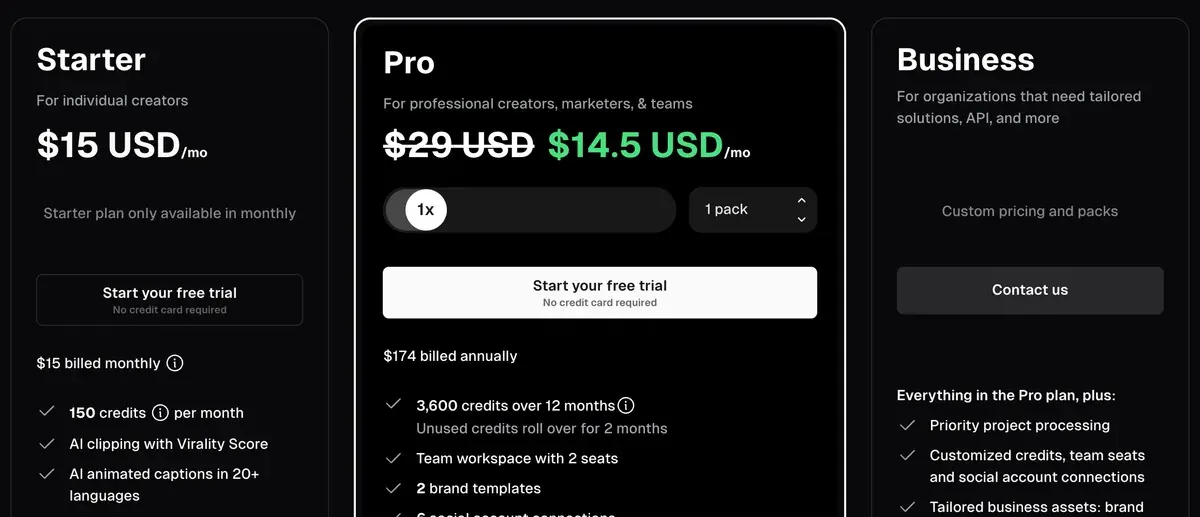
On Pro billed monthly, an hour-long video costs $5.80, or about $0.18 to $0.25 a clip.
Every plan: OpusClip pricing.
Mistakes public reviews report
Across 54 public reviews from Trustpilot, Product Hunt and Reddit, three mistakes recur.
Clipping long videos in full. Five of 54 call it costly (Trustpilot, Reddit). Trim with the timeframe slider first.
Leaving clips on the server. Two of 54 lost projects after a lapsed plan (Trustpilot). Download clips the day they render.
Trusting the editor to save. Six of 54 report failed uploads, lost saves and broken framing (Trustpilot). Export a finished clip before you start the next one.
Before you upload client footage or a card, read is OpusClip safe?. Trial logo: OpusClip watermark. Closest rival: Klap vs OpusClip.
Questions about using OpusClip
How do I make OpusClip find a specific moment?
Choose ClipAnything and type a prompt naming the subject, the action and any sound, such as “Find the guest laughing after the first question”.
Does reprompting OpusClip cost credits?
The credit article lists no charge for a reprompt.
Can I use OpusClip for free?
Yes, with 60 credits a month and a watermark. Free clips stop exporting after 3 days, and the Pro trial turns into the Free plan after 7 days.
Sources
- OpusClip help centre: How Do Credits Work?, 1 credit per minute of the original video; under a minute rounds up, partial minutes round down; the Processing timeframe slider; 3 credits per X post per account. Checked
- OpusClip help centre: How to use ClipAnything?, five steps from link to caption preset; recommended for videos with little talking. Checked
- OpusClip help centre: ClipAnything Prompts Manual, what a prompt can find, what it cannot do, the subject, visual, action, sentiment and sound checklist, English prompts only. Checked
- OpusClip help centre: ClipAnything vs ClipBasic, ClipBasic takes only keywords spoken in the video and clips talking-head videos well. Checked
- OpusClip help centre: Use prompts to clip specific moments, prompt before submission or on the result page; reprompt as many times as you like. Checked
- OpusClip help centre: Can I reprompt and regenerate clips?, one prompt at a time; each new prompt opens its own tab of clips. Checked
- OpusClip help centre: Why did ClipAnything fail to find what I was looking for?, the model is in beta; videos with no audio or static scenes can return nothing. Checked
- OpusClip help centre: How long does ClipAnything take?, typically 20 to 40 minutes, depending on the length of the raw video. Checked
- OpusClip help centre: What is the Virality Score?, 0 to 99, from hook, flow, value and trend; Starter and Pro only. Checked
- OpusClip help centre: Select your Clip Length, default Auto (0m-3m). Checked
- OpusClip help centre: Local File Uploads, up to 10GB and 10 hours; non-integer frame rates not supported. Checked
- OpusClip help centre: Manual Reframe, the Crop button, a double click on the scene or the X key; hold Shift to select several scenes, then right-click to change their layouts. Checked
- OpusClip help centre: Change or Remove Captions, edit words, fonts and position; Add a Section; no bulk caption edit. Checked
- OpusClip help centre: Add B-roll to your video, Find spots takes about 30 seconds; AI image, AI video or stock; not on the free plan; failed generations return their credits. Checked
- OpusClip help centre: Schedule Your Clips, post from the results page or the Calendar; delete a scheduled post from the Calendar. Checked
- OpusClip help centre: Refunding a Project, Pro users, before any clip is downloaded, up to 14 days after upload. Checked
- OpusClip help centre: Deleting a project, credits used on a deleted project are not refunded. Checked
- OpusClip help centre: Features not included in the free trial, trial exports watermarked; no posting, scheduling, bulk download or teams. Checked
- OpusClip help centre: Pause or cancel a free trial, a trial Pro account converts to a Free Forever account after 7 days. Checked
- OpusClip help centre: Get Your Clips, 30 to 60 minutes of video gives 23 to 32 clips; ClipAnything usually gives slightly more than ClipBasic. Checked
- OpusClip: OpusClip pricing, plan cards; in the AI copilot row, Select clipping timeframe on every plan, Prompt to clip and Topics search under Pro and Business; no credit card for the Free plan. Checked

Alexandre S.
Alexandre S. is a creative ad strategist and copywriter with ten years' experience in digital marketing across multiple channels.
Related pages
-
 Pricing OpusClip pricing
OpusClip Pro costs $29 a month, or $14.50 a month billed yearly ($174), for 300 credits, 1 per source minute. Every plan and the trial, checked 16 Nov 2026.
-
 Alternatives Opus Clip alternatives
Seven tools that could replace OpusClip, compared on price per source minute or per clip, free plans for ads and commercial rights, read 16 November 2026.
-
 Best list AI clipping tools
Eight AI clipping tools for podcasts and streams, compared on cost per minute or per clip, free plans, longest video and ad rights, read 16 November 2026.
-
 Guide Clipping for money
Clipping for money: Content Rewards says campaigns that fill mostly pay 0.80 to 2 dollars per 1,000 views, minus a 10% fee. Checked 16 November 2026.


