Connected TV ads for small business
Connected TV ads are video ads that play on a television streaming over the internet, inside apps such as Prime Video or a Roku channel. They run between shows like an ordinary commercial, but you buy them online and can aim them at one town.
Universal Ads says you can start at $100, and Roku sets $500 per campaign. The harder part is the file: Roku, Amazon and Vibe all want a horizontal video, and your vertical phone ad fails that check. Creatify makes that horizontal spot from a product page.
This table compares six routes a small business can buy without a sales call. Universal Ads names the lowest campaign start, Vibe the lowest daily figure, and Amazon shows the widest gap between its own pages.
| Platform | Smallest buy | Price per 1,000 views |
|---|---|---|
| Universal Ads | Minimum listed as None, $100 to start, $1,000 for a real test | Not published |
| Vibe | $50 a day | $15 to $35 on its simulator |
| Roku Ads Manager | $500 per campaign | Not published; you can set a maximum bid |
| Amazon streaming TV | No minimum on one page, $10,000 recommended on another | Bids from $15, guidance $25 to $30 |
| MNTN | $2,000 | Not published |
| YouTube on TV screens | Your Google Ads budget; no TV minimum listed | Auction, not published |
Scroll sideways for all 3 columns

What is CTV advertising, and how is it different from OTT?
CTV advertising means ads on a connected TV: a smart TV, or a stick or box that brings the internet to an ordinary set. Amazon’s guide treats CTV as the device. OTT, short for over-the-top, is how the shows reach you over the internet.
So the two words describe one buy from two angles, and a small business can treat them as one thing.
OTT advertising examples are easy to picture. A 15-second spot before a Prime Video film is one, and a Roku channel’s ad break is another. Universal Ads lists more than 20 publishers, Fox and Paramount among them.
What does a connected TV ad cost?
A connected TV ad costs a price per 1,000 views, known as CPM, times the number of views you buy. Vibe’s simulator shows $15 to $35.
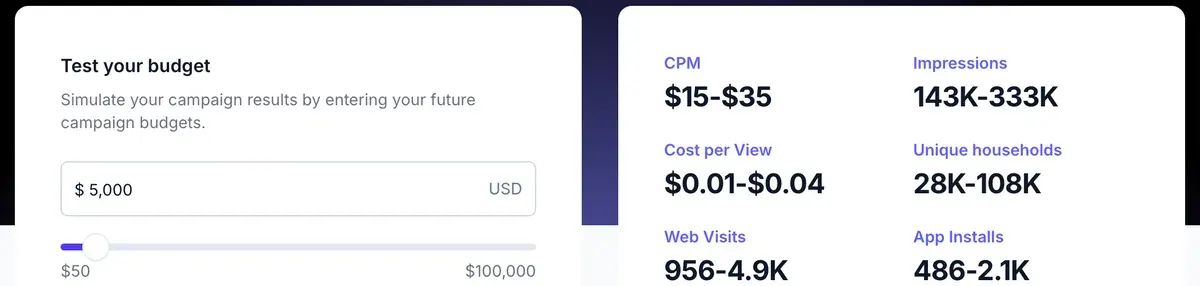
Amazon recommends starting bids of $15 and bills per 1,000 views, so the two sit in the same range.
Put Roku’s minimum through that range. $500 divided by those rates buys about 14,300 to 33,300 views. Treat that as a sum, since Roku publishes no rate of its own.
Is that enough? In one town, for a local service, it can reach the same homes several times. Spread across a state, it disappears.
Two vendors name a figure, and both sell the media, so neither comes with results attached. Universal Ads calls $1,000 a real test, and Roku suggests $500 to $1,000 for a first campaign.
How much does it cost to advertise on Roku?
Pricing model. Roku Ads Manager uses a CPM pricing model, meaning you pay based on how often your ad is shown.
First budget. For most first-time advertisers, $500–$1,000 is enough to get a campaign live
Amazon’s product page says no minimum spend applies to placement, then recommends $10,000 for self-service packages. Its small-business guide says no minimum and no fees.
If you do not sell on Amazon, the guide gives a small-budget route. Register under Sponsored ads with the United States as your country, and choose “Products and services not sold on Amazon”. Then pick streaming TV when you create a campaign.
Which platform fits a small business?
The right platform depends on what you already run and how far your customers travel.
- If you already run Google Ads, start with YouTube on TV screens. Demand Gen, Google’s campaign type for video and images, can target TV screens as a device, and you keep your existing account.
- If you serve one city, compare Universal Ads and MNTN. Universal Ads says local buys target a single city or region, at the lower start. MNTN says it reaches local areas across 150+ streaming networks.
- If you test in short bursts, try Vibe, which starts at a daily figure with no commitment.
- If you want no upfront payment, use Roku. You pay as the campaign delivers, and you can pause or extend at any time.
Skip TV for now if you need a sale this week from people ready to buy. Search ads catch those people at the moment they look. TV works when a customer needs to know your name before the day they need you. Think of a heating firm, a dentist or a roofer.
What file does a TV platform ask for?
Roku, Amazon and Vibe all ask for a 16:9 horizontal video, and they differ on sharpness. That is measured as bit rate, the amount of picture data per second. On Roku, a file that fails the technical check fails on upload.
| Rule | Roku | Amazon | Vibe |
|---|---|---|---|
| Shape | 16:9 | 16:9 | 16:9 |
| Smallest frame | Not stated | 1920 x 1080 | 1280 x 720 |
| Length | 6 to 92 seconds | 15, 30, 45 or 60 seconds on Prime Video | 5 to 90 seconds |
| File | MOV or MP4 | MP4 | MP4 |
| Largest file | 1 GB | 500 MB | 100 MB |
| Lowest bit rate | 6 Mbps | 15 Mbps for Prime Video, 8 Mbps elsewhere | 2.5 Mbps |
| Frames a second | 23.98, 25 or 29.97 | 23.976, 24, 25 or 29.97 | 23.976, 24, 25, 29.97 or 30 |
| Audio | 2-channel, 48 kHz | AAC, 192 kbps or more | Mix at -10 to -14 dB |
Scroll sideways for all 4 columns
One master file clears all three: 1920 x 1080, MP4, H.264, 16 Mbps, 25 frames a second, stereo AAC at 192 kbps and 48 kHz. At 16 Mbps, 30 seconds comes to about 60 MB, inside Vibe’s limit. The rules come from Roku, Amazon and Vibe, with Vibe’s mix level from its formatting specs.
How to get started with Roku Ads Manager
Budget. Brands can start with $500
Length. video ads of any length between 6 and 92 seconds
Roku also refuses YouTube links, so keep the file itself. Google works the other way round, and wants the video uploaded to YouTube first.
Why does a phone-shaped UGC ad fail on a TV?
A UGC ad, the talk-to-camera style filmed on a phone, fails on a TV first because of shape: vertical video cannot pass a 16:9 check. Pasting it into a wide frame with black bars passes the check and leaves a narrow strip of picture in the middle of the set.
The bigger problem is how the ad talks to people. A phone ad is built for a thumb at arm’s length. On a TV nobody can tap, and the viewer sits across the room. Creatify’s page puts the test as “Readable from the couch”.
That changes four things in the edit:
- Replace “tap the link” with a web address short enough to remember, or a QR code. Google generates QR codes for TV screens and advises against baking one into the video. Older TVs do not show them.
- Show who you are early. Amazon asks for your logo or product in the first 3 seconds.
- Leave room for the ending. The same guide asks for a four-second end card, and those seconds come out of your script.
- Keep captions large and inside the title-safe area, the central zone editors reserve for text.
How do you make a 15-second TV spot with AI?
You make a 15-second spot with AI by writing to the clock, generating it in 16:9, then checking the file before upload.
Creatify’s OTT and CTV page says its agent turns a product page into a 16:9 spot. The first version runs 15 seconds, with captions in the title-safe area and a web address on the end card.
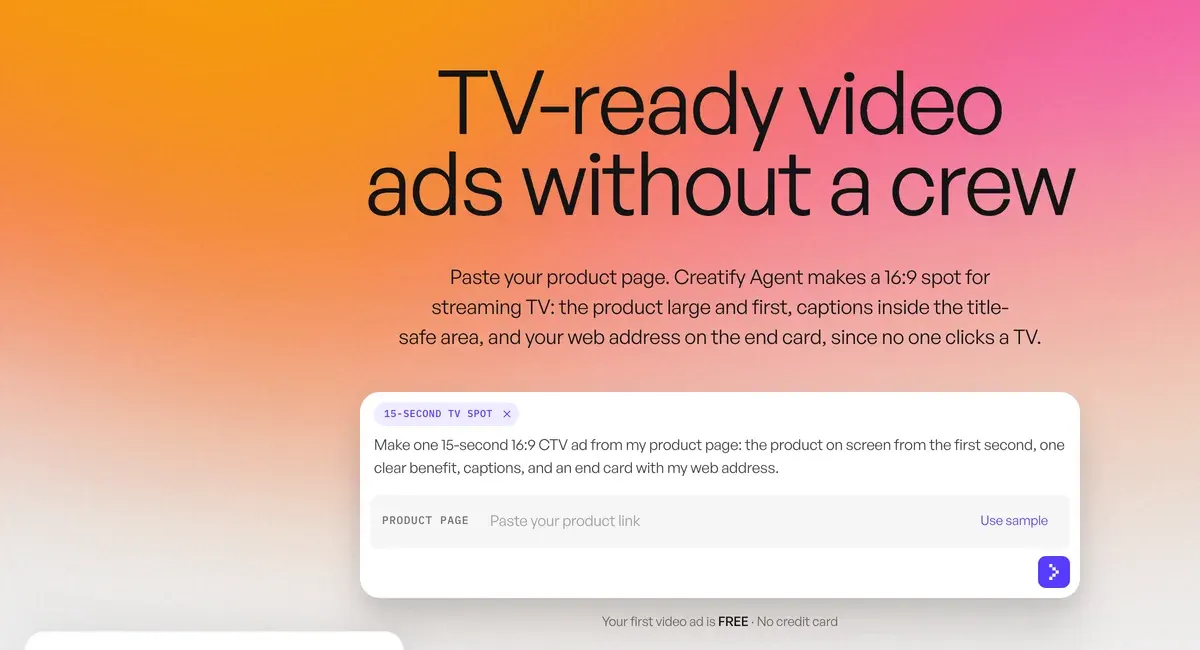
The page also lists a 6-second bumper and a conversion of a vertical social ad into a TV spot.
Count the words first. Take off Amazon’s four-second card and 11 seconds are left to speak. At 150 words a minute, that is about 27 words.
Here is that sum as a script for a made-up heating firm. The presenter stands beside a photo of the firm’s van.
- 0 to 3 seconds: logo in the corner, van on screen. “Furnace quit overnight?”
- 3 to 11 seconds: “Northside Heating sends a technician the same day, seven days a week, and you see the price before any work starts.”
- 11 to 15 seconds: end card, no voice, with the firm’s name, web address and phone number.
Creatify publishes a rate for Avatar Video, so that is the sum to run: 5 credits per 15 seconds. On Standard at $15 a month, a 15-second avatar spot works out at $1.36, and a 30-second one at $2.73, if every credit is used. Standard’s 55 credits cover 11 spots of 15 seconds. Creatify’s prices were last read on .
Three catches sit behind those numbers:
- Agent runs have no fixed rate. The credit article says Agent uses a variable number of credits that cannot be set upfront. Creatify’s OTT page says the agent shows the cost before it creates anything. Read that figure before you confirm. Users name credits running out faster than the pricing suggests (15 of 61 sources: Trustpilot, r/FacebookAds).
- Billing rounds up, so a 16-second spot costs the same as a 30-second one.
- Free exports carry a watermark. The free plan’s 10 credits let you judge a draft, and a paid plan makes the version you upload.
Creatify’s page gives the shape, with no pixel size or bit rate. Open the export’s file details and compare them with the table above. If the bit rate falls short, re-export through your editor at 16 Mbps, which meets the rule and adds no detail.
When is Creatify the wrong pick for a TV ad?
Creatify is the wrong pick when your customers need to see your actual people and premises. A dentist’s own surgery and a builder’s finished houses are the proof, and an AI presenter cannot stand in them.
Users also say avatar ads share a templated look that holds at scroll speed and weakens up close (6 of 61 sources: r/PPC, r/FacebookAds). A TV spot holds that face on a big screen for 15 seconds, with no scroll to hide it.
In that case, film your premises on a phone held sideways and keep AI for the voice and end card.
It is also an extra cost if your platform already has a tool:
- Universal Ads has its own AI video generator. It was built with Creatify, announced as free in September 2025, and makes a 15-second ad inside the platform.
- MNTN has QuickFrame AI, which AdExchanger described in May 2026 as its own monthly subscription.
- Roku points to Spaceback, which reworks social videos into TV assets. Roku’s customer Rollo says it did this “for free”.
Creatify earns its fee when you want one master for several platforms, or the same offer cut for TV, Reels and TikTok. Universal Ads also names Creatify among its creative partners. AI commercial generators lists tools built for cinematic scenes in place of a presenter.
Do you have to label an AI presenter on TV?
New York has required a synthetic performer disclosure in advertisements since 9 June 2026. Check that rule before an AI presenter reaches New York homes. AI ad disclosure rules quotes that rule, California’s and each platform’s own.
Car dealer ads cover which cars get a video and what it can say.
HVAC ads, plumber ads and roofing ads on video cover licence rules and peak timing.
Questions about connected TV ads
Are CTV ads worth it for a small business?
They suit a local business whose customers buy rarely and need to know the name first. Start with $500 to $1,000 in one area, and judge it on branded searches and direct visits, since viewers cannot click.
Can you skip connected TV ads?
Often no. Amazon calls its streaming TV ads non-skippable. The YouTube route differs: Google says Demand Gen does not support non-skippable ads.
How long should a CTV ad be?
Make 15 or 30 seconds. Both fit Roku, Vibe and Prime Video, and Prime Video’s other lengths are 45 and 60 seconds.
Can I use my Facebook ad on TV?
Reuse the idea and the script, then remake the picture in 16:9 with a new call to action. The vertical file fails the shape rule on Roku, Amazon and Vibe.
More pages for Creatify users, sorted by job, in the Creatify hub
Sources
- Universal Ads: Can I advertise on TV without a big budget?, start at 100 dollars, 1,000 dollars as a real test, no required minimum, no agency charge, Creatify named among creative partners; byline 23 June 2026. Checked
- Universal Ads: How to know which CTV advertising platform works best for you, minimum spend listed as None; 21 publishers listed and described as 20+, including Fox, NBCUniversal, Paramount, Roku, Samsung and Warner Bros. Discovery. Checked
- Universal Ads: Universal Ads launches AI powered video generator, 16 September 2025; developed in partnership with Creatify; a 15-second ad; beta at launch; the headline says free; refers to Comcast’s businesses, including Universal Ads. Checked
- Roku Ads Manager help: Campaign budget and schedule, lifetime budgets are required on all campaigns and must be 500 dollars or more. Checked
- Roku Ads Manager help: Video upload requirements, 16:9, 6 to 92 seconds, MOV or MP4, 1 GB, AVC or ProRes 422 HQ, 6 Mbps minimum, 23.98, 25 or 29.97 frames a second, 2-channel audio at 48 kHz, no YouTube links. Checked
- Roku: How much does it cost to advertise on Roku?, 25 February 2026; CPM pricing, no rate published, a maximum bid, 500 to 1,000 dollars suggested for first-time advertisers, traditional commercials
upwards of $10,000
, Spaceback;no need to pay upfront
,Pay as your campaign delivers
, campaigns paused or extended at any time. Checked - Roku: How to get started with Roku Ads Manager, brands can start with 500 dollars; video ads of any length between 6 and 92 seconds. Checked
- Vibe: Vibe pricing, starts at 50 dollars a day; the budget simulator shows a CPM of 15 to 35 dollars. Checked
- Vibe help: Video creative compliance, 16:9, 1280x720 minimum, 5 to 90 seconds, MP4, 100 MB, 2,500 Kbps minimum, constant 23.976, 24, 25, 29.97 or 30 frames a second. Checked
- Vibe help: What are Vibe’s video formatting specs?, overall mix level -10dB to -14dB. Checked
- Amazon Ads: Streaming TV ads, no minimum spend for placement; 10,000 dollars recommended campaign minimum on self-service packages, 50,000 on managed service; click with a remote or scan with a phone. Checked
- Amazon Ads: How any business can get started with streaming TV ads, no minimum spend or fees; start with 15-dollar bids, guidance 25 to 30; logo or product in the first 3 seconds; a four-second end card; open to businesses that do not sell on Amazon: under Sponsored ads select United States, choose
Products and services not sold on Amazon
, then choose streaming TV under Create campaign. Checked - Amazon Ads: Streaming TV and Prime Video ad specs, 16:9, 1920x1080 minimum, 500 MB, 15 Mbps for Prime Video and 8 Mbps elsewhere, 23.976 frames a second recommended with 24, 25 and 29.97 accepted, AAC at 192 kbps or more; Prime Video lengths 15, 30, 45 or 60 seconds. Checked
- Amazon Ads: Connected TV advertising, CTV defined as devices connected to the internet, OTT as how the content is distributed. Checked
- MNTN: To Go Big, Think Small (Business),
as little as $2,000
; 150+ streaming networks; geo-targeting of local areas; tracking in MNTN or Google Analytics. Checked - AdExchanger: MNTN wants its AI video ad generator to stand apart from its CTV platform, 7 May 2026; QuickFrame AI as its own monthly subscription, no price given. Checked
- Universal Ads: Can small businesses advertise on television?, local buys target a single city or region; the dashboard reports impressions, conversions and traffic lift. Checked
- Google Ads Help: About QR codes for connected TV, system-generated QR codes on TV screens;
Avoid embedding QR codes directly into your video files
; Demand Gen and Performance Max; non-skippable ads not supported in either; not on YouTube TV or Google TV inventory; older TVs do not show them. Checked - Google Ads Help: Demand Gen video asset specifications, video must be uploaded to YouTube; 5 seconds minimum, over 15 seconds recommended; TV screens as a device target. Checked
- Creatify: OTT and CTV advertising, 16:9 spot from a product page, 15 seconds first, a 30-second cut on request with the cost shown first;
The agent shows the cost before it makes anything
; no pixel resolution or bit rate stated. Checked - Creatify: Creatify pricing, plans and credits, from src/data/tools.json. Checked
- Creatify help centre: Credit usage, billing and validity, Avatar Video 5 credits per 15 seconds, rounded up; exact cost shown before render on most tools; Agent credit use is variable and
cannot be determined upfront
. Checked - New York State: Governor Hochul announces law requiring disclosure of synthetic performers in advertisements, in effect 9 June 2026. Checked
- Reddit and others, as counted in our reviews file: Public user reviews of Creatify, 61 sources, 6 name a recognisable templated look on avatar ads. Checked

Alexandre S.
Alexandre S. is a creative ad strategist and copywriter with ten years' experience in digital marketing across multiple channels.
Related pages
-
 Profile Creatify for UGC ads
Creatify bills avatar video in 15-second blocks, so a 30-second ad uses 10 credits. Its ad terms and 20 latest Trustpilot reviews, read 24 September 2026.
-
 Best list AI commercial generators
AI commercial generators compared on whole film or clips only, voice, length limit, cost of 30 seconds and ad terms. Checked 6 November 2026.
-
 Guide How to use Creatify
A 30-second Creatify ad uses 10 credits, and the agent’s cost is unknown until it finishes. Eight steps to a first ad, with what each spends, 5 November 2026.
-
 Guide AI disclosure in advertising, platform by platform
Where a platform or a law asks you to disclose AI in an ad, each rule quoted with its date. Meta, TikTok, YouTube, New York, California and the EU.
-
 Guide YouTube Shorts ads
YouTube Shorts ads run through six Google Ads campaign types. Which one lets you pick Shorts, the specs and the Reel margin trap. Checked 7 November 2026.


