Renderforest alternatives
Verdict on Renderforest alternatives
Leave Renderforest for client work or avatar ads; stay for template ads, a logo and a site on one bill. Its terms keep Lite and Pro to your own business, so client videos on a subscription need Business at $59 a month (checked ).
But Lite’s Kling 3.0 Omni clips cost $0.206 a second if every credit is used, against $0.30 on invideo Starter.
For client ads on an entry plan:  Creatify
Its terms cover use you permit to be made
by others (7.3); Renderforest asks agencies for Business.
For talking-avatar ads in many languages:  HeyGen
Creator lists 175+ languages, and an Avatar III video avatar uses 4 credits a minute.
For a whole video written, cut and voiced by one agent:  invideo AI
Outputs may be commercialised, and the licence survives cancelling (terms 4(h)).
For free template designs for your own ads:  Canva (Canva AI and Canva Grow)
Its AI terms give you the Output except for any Output that modifies or incorporates Licensed Content
.
For ads cut from your own footage on a desktop: Filmora
Individual plans add Video is made by Filmora
to the video description (EULA).
| Tool | Monthly from (USD) | Free plan | Paid ads on the cheapest paid plan | Official site |
|---|---|---|---|---|
| Renderforest The tool you are replacing | $15 | Yes | Allowed with conditions (Lite) | Visit Renderforest |
 Canva (Canva AI and Canva Grow) | Unverified | Yes | Allowed with conditions (every paid plan) | Visit Canva |
 Creatify | $15 | Yes | Allowed with conditions (Standard) | Visit Creatify |
| Filmora | Unverified | Yes | Allowed with conditions (every paid plan) | Visit Filmora |
 HeyGen | $29 | Yes | Allowed with conditions (Creator) | Visit HeyGen |
 invideo AI | $20 | Yes | Allowed with conditions (Starter) | Visit invideo AI |
Scroll sideways for all 5 columns
Prices checked between 9 Nov 2026 and 10 Nov 2026. The prices of Canva (Canva AI and Canva Grow) and Filmora are unverified.

Why people switch from Renderforest
Renderforest is a browser studio for animated templates and AI video, with logos and one-page websites on the side. Its documents and its reviews show three catches to weigh before you renew.
The first is the licence. Its terms let you use exported videos “to advertise your own products or services”. The Restrictions section then calls Lite and Pro “exclusively intended for personal use” and bars making videos “on behalf of entities other than your own”.
So a freelancer or agency making client ads needs Business, capped at 100 reselling videos, or a single reseller export per video.
The second is billing. We read the 28 reviews on the first two pages of Renderforest’s Trustpilot page on 9 November 2026. Seven describe billing trouble, from refunds refused and charges after cancelling to a cancel button that is hard to find (Don McDaniel, Sam Avanessov). Ten of the 28 praise the support team (Gerd Peter Vogel, Stas Polunin).
Its terms make subscription fees non-refundable except where the law requires, and annual plans are paid upfront.
The third is the credit count. The pricing page gives Lite, Pro and Business 800, 2,400 and 6,000 AI credits a month.
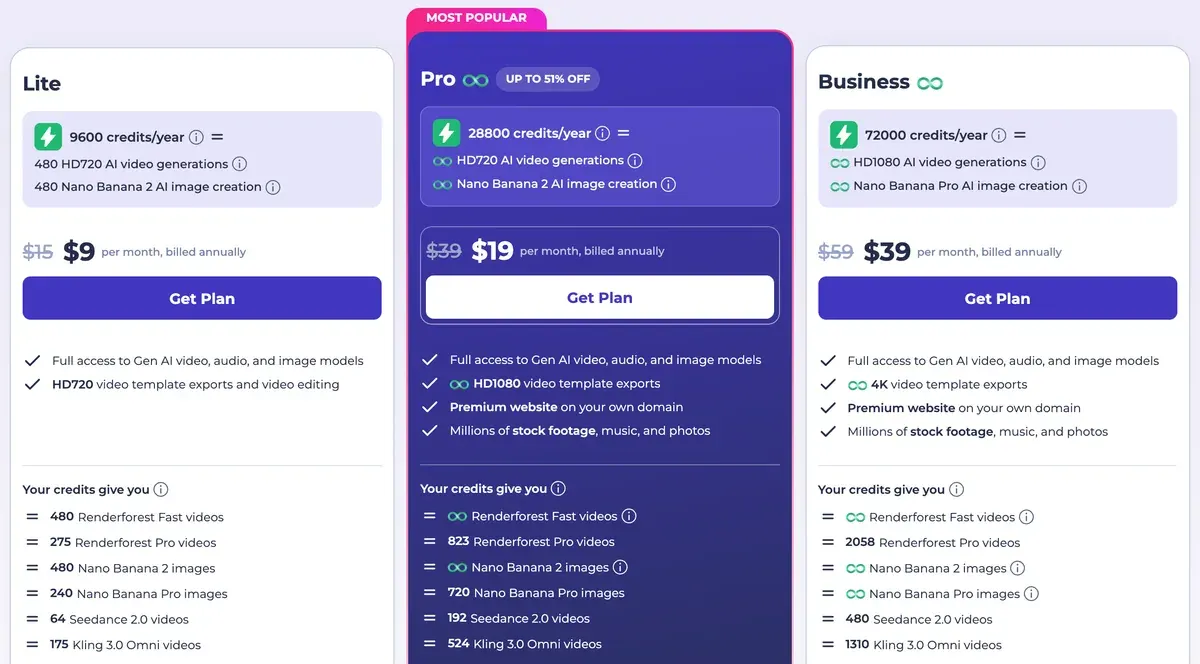
A help article modified on 9 September 2026 says 400, 1,600 and 3,000. Credits reset each cycle with no rollover (AI Products Terms, section 3).
More on the plans: Renderforest pricing and the Renderforest profile.
What each entry plan buys, and who may use the videos
Creatify Standard costs the same as Renderforest Lite and its terms cover client use. Renderforest’s own route to client work is Business.
| Tool and plan | A month (USD) | What it buys | Client videos on this plan |
|---|---|---|---|
| Renderforest Lite | $15 | 800 credits: 24 Kling 3.0 Omni clips of 3 seconds at 720p, at 33 credits each | No: own business only (Restrictions) |
| Renderforest Business | $59 | 6,000 credits, 4K template exports, seats | Yes, up to 100 reselling videos |
| Creatify Standard | $15 | 55 credits: five 30-second avatar videos at 10 credits each | Covered: use you “permit to be made” (7.3) |
| HeyGen Creator | $29 | 600 credits: 150 minutes of Avatar III video avatar at 4 a minute | Yes: you own the output (3); only your staff and contractors log in (2) |
| invideo AI Starter | $20 | 400 credits: 13 Seedance 2.0 Fast clips of 5 seconds at 720p | Yes: “commercialise Outputs” (4(h)); stock media keeps its own licence |
Scroll sideways for all 4 columns
Each count is the plan’s credits divided by the published rate for that job. Canva and Filmora are left out of the table: their official pages show different prices by country or by shop.
 Creatify: URL-to-video ads with client use written into the terms
Creatify turns a product page link or a script into avatar and product video ads, then launches them to ad accounts from the same tool. Standard lists $15 a month for 55 credits, 300 AI actors and the Ad Launcher (pricing page).
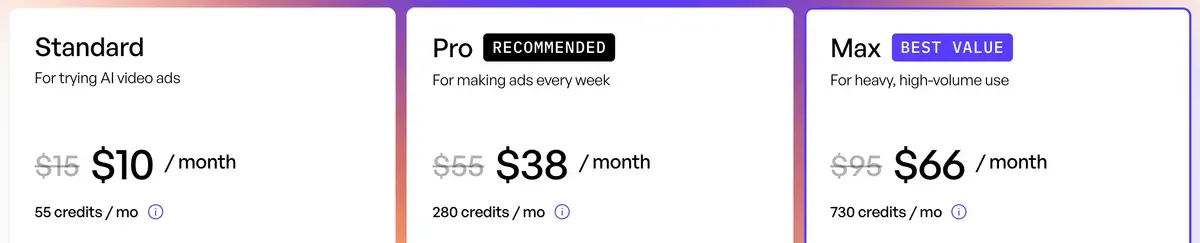
Avatar video uses 5 credits per 15 seconds, rounded up (help centre). A 30-second ad costs $2.73 on Standard. A 31-second one bills as 45 seconds.
That matters for agencies. Creatify’s terms cover use you “permit to be made” by others (7.3) and assign you any copyright Creatify holds (6.2). The catch sits in 6.2 too: a breach of its Moderation Policy hands “all rights granted to you” back to Creatify.
More: the Creatify profile and Creatify vs invideo AI.
 HeyGen: talking-avatar ads at a published rate a minute
Renderforest lists its own Avatar model, but neither its terms nor its AI Products Terms address stock avatars in ads. HeyGen is built around avatars, and its help centre prices each model.
An Avatar III video avatar uses 4 credits a minute, Avatar IV 31 and Avatar V 48 (credits article). On Creator, at $29 a month, a 30-second ad comes to $0.10 to $1.16 by model.
Creator lists 175+ languages, so one script can be voiced for each language you buy media in (pricing page).
Skip the free plan for ads. HeyGen’s terms bar Free output from “advertising” and “client work” (section 4). Section 2 also asks you to disclose AI generation where the law requires it.
More: the HeyGen profile and HeyGen vs invideo AI.
 invideo AI: one agent builds the whole edited video
Renderforest starts you from a template. The agent in invideo AI starts from a prompt. It writes the script, picks stock and generated shots, then adds a voice and hands you an edited video. Its UGC ads page turns a product or app link into UGC-style ads.
Starter lists $20 a month for 400 credits (pricing page).
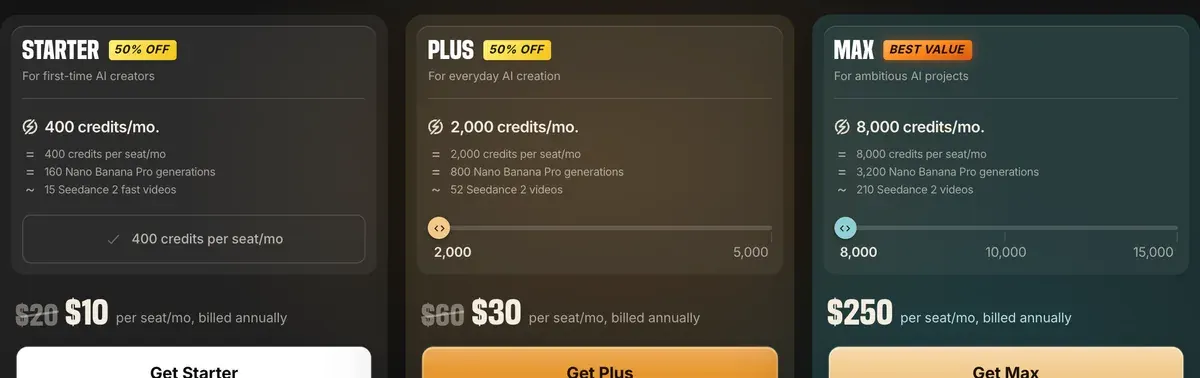
The card’s “~15 Seedance 2 fast videos” rounds up: at about 30 credits a video, 400 credits make 13. It excludes Seedance 2.5 and Seedance 2.0 at 1080p, and credits do not roll over.
Per second of generated clip, Renderforest Lite costs less. Seedance 2.0 Fast at 720p comes to $0.30 a second on Starter, against $0.206 for Kling 3.0 Omni at 720p on Lite. The two use different models, so treat that as the price of a short clip on each.
The terms let you “commercialise Outputs”, and that licence survives cancelling (4(h)). Two catches: invideo “may use your User Data to train” its models (4(f)), and the pricing FAQ lets it change credit costs “at any time, without prior notice”.
More: the invideo AI profile.
 Canva: free template designs, with library content kept on licence
Canva is the closest match to Renderforest’s template library, and it has a free plan.
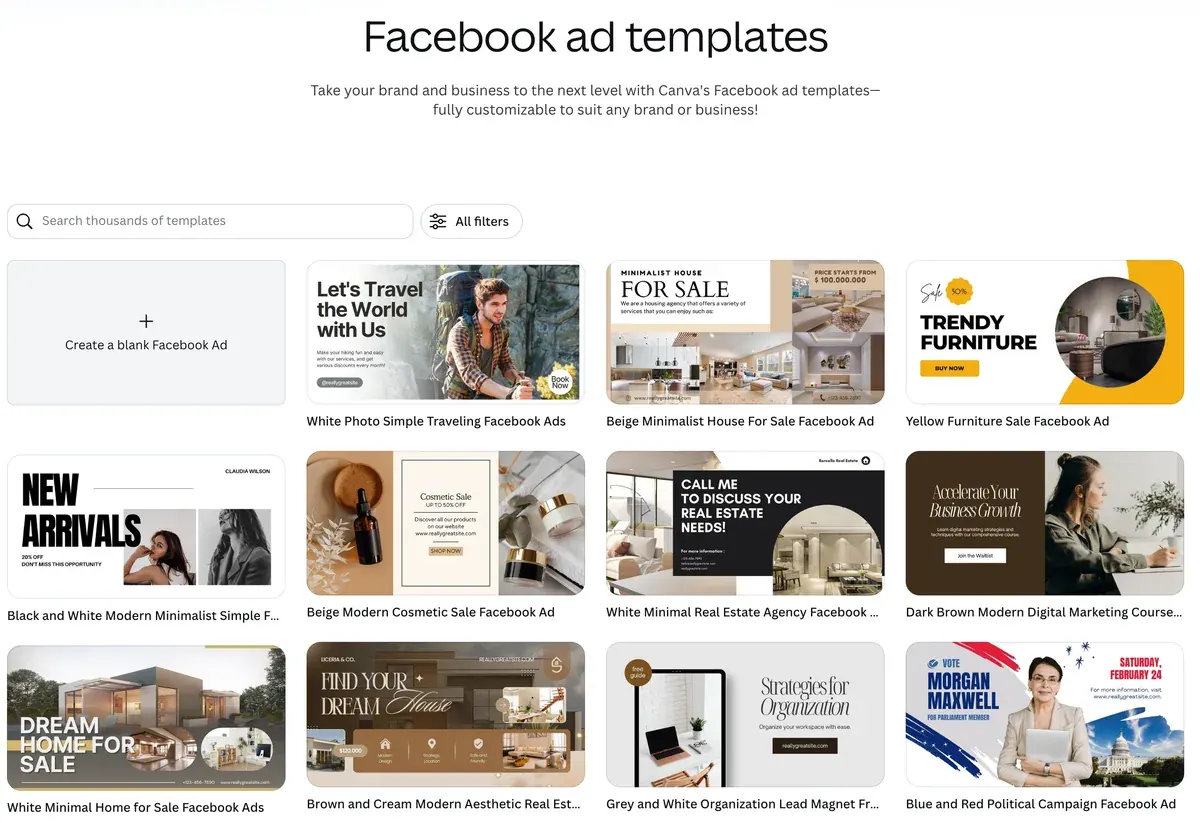
Its Pro page pitches Canva Grow as “AI ad creation”: you drop in a website address and it pulls your brand’s visuals into ads (Canva Pro, archived).
The rights answer is cleaner than Renderforest’s for free users. Canva’s AI Product Terms (26 June 2026) say you own your Output “except for any Output that modifies or incorporates Licensed Content”. Renderforest’s help centre limits Free content to “personal, non-commercial use only”.
Client work has a limit. Under Canva’s Content License Agreement (4A), a design holding library content can go to one client only. A written agreement must bind that client to Canva’s licence.
Canva’s AI allowance has no fixed published quota: its terms call usage limits “operational controls and not fixed entitlements”.
Filmora: a desktop editor for ads cut from your own footage
Filmora is Wondershare’s desktop editor for Windows and Mac, with a timeline editor for ads cut from footage you film yourself.
Its licence agreement allows commercial use on individual plans if you write “Video is made by Filmora” in the video description. The Business plan drops that line.
Keep its AI generations out of paid ads. Filmora’s support FAQ limits “all other AI-generated materials” except AI music to “personal/non-commercial use only”.
More: the Filmora profile.
When Renderforest is still the better buy
Stay if you sell your own products and want a template ad, a logo and a one-page site from one login.
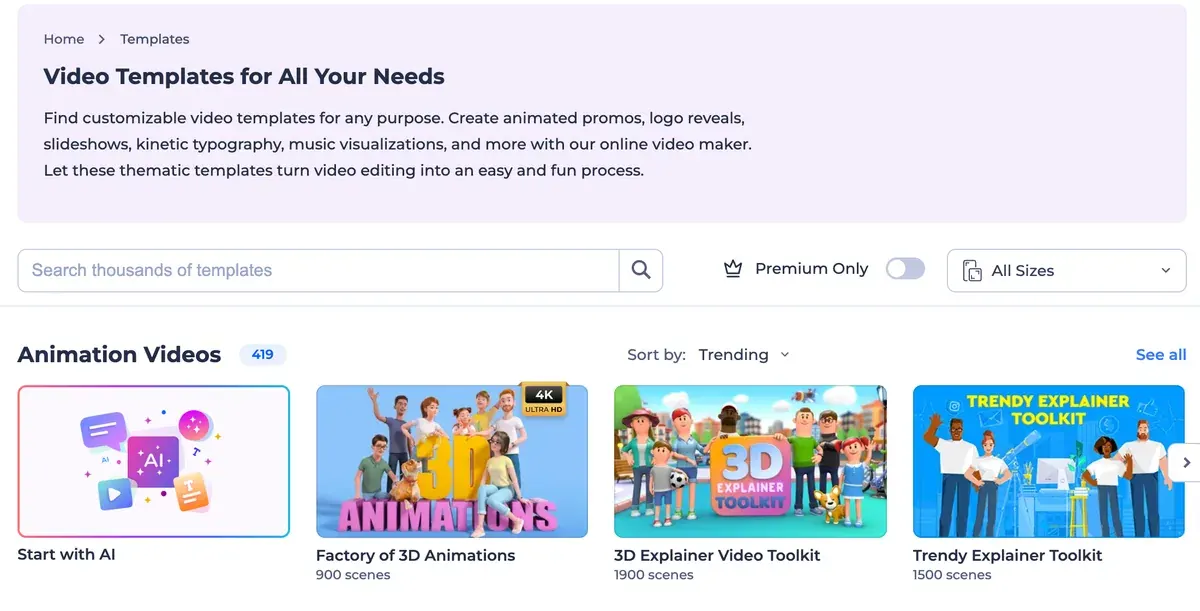
Pro includes one premium website on your own domain.
Stay for cheap AI clips too. Lite runs Kling 3.0 Omni, Seedance and MiniMax H3 on one credit balance (pricing page). Pro adds unlimited Renderforest Fast video at 480p and 720p, with no credits spent.
And for one video, skip the subscription. A single 720p template export costs $9, and 1080p with a reseller licence $24.
Left out, and why
Kling AI sells the model Renderforest resells. Its Terms of Service (4.6) bar commercial use without a membership or Kling’s written permission.
Pippit has a free plan with daily credits, but Free output is watermarked and its plans and prices vary by region (pricing page).
For whiteboard explainers, a creator compares Renderforest with Animaker and Mango Animate.

More video tools, compared on price and rights: the AI video hub.
Questions buyers ask about Renderforest alternatives
Is there a free Renderforest alternative for ads?
Canva’s free plan is the clearest: its AI terms give you your own Output “for any lawful purpose”, library content aside. Creatify Free gives 10 credits a month with watermarked exports, and its terms say Free users “have limited rights” without listing them (terms). HeyGen’s free plan bars ads.
Can an agency use Renderforest for client ads?
On a subscription, only on Business: its terms limit Lite and Pro to your own entity and cap Business at 100 reselling videos. For one client video, a single 1080p export with a reseller licence costs $24. Enterprise, above that, is sold through support with no public price.
Which Renderforest AI alternative makes avatar ads?
HeyGen for a talking presenter in many languages, and Creatify for product ads built from a store link. Both sell commercial use on their first paid plan, where Renderforest’s terms do not address stock avatars in ads.
What does Reddit say about Renderforest?
A search of Reddit’s archive finds no Renderforest post since 2020. The recent user reviews sit on Trustpilot. There, 10 of 28 praise support (Gerd Peter Vogel, Stas Polunin) and 7 of 28 report billing trouble after a renewal or a cancellation (Don McDaniel, Sam Avanessov).
Sources
- Renderforest: Renderforest pricing, Lite, Pro and Business cards, AI credits and the model list the page loads; single exports from the products pricing data. Checked
- Renderforest: Renderforest Terms and Conditions (last updated 14 October 2022), Video Maker, Restrictions and Refunds sections. Checked
- Renderforest: Renderforest AI Products Terms, in the privacy policy (last updated 18 February 2026), sections 3 and 8. Checked
- Renderforest help centre: Can I use the images I generate for commercial purposes?, Free plan content is personal and non-commercial (modified 25 September 2026). Checked
- Renderforest help centre: A guide to choosing the best subscription plan, credit counts of 400, 1,600 and 3,000 a month (modified 9 September 2026). Checked
- Trustpilot: Renderforest reviews, 28 reviews on the first two pages, dated 3 November 2025 to 8 November 2026. Checked
- Creatify: Creatify pricing, Free and Standard cards. Checked
- Creatify help centre: Creatify credit usage, billing and validity, 5 credits per 15 seconds of avatar video, rounded up. Checked
- Creatify: Creatify terms (effective 23 September 2024), sections 1, 6.2 and 7.3. Checked
- HeyGen: HeyGen pricing, Free and Creator cards. Checked
- HeyGen help centre: How to use credits on HeyGen, credits a minute by avatar model. Checked
- HeyGen: HeyGen terms of service (last updated 15 October 2026), sections 2, 3 and 4. Checked
- invideo: invideo AI pricing, Starter card, model credit table and credits FAQ. Checked
- invideo: invideo terms of service (effective 12 August 2026), sections 3(d), 4(f) and 4(h). Checked
- invideo: invideo UGC ads. Checked
- Canva, via the Wayback Machine: Canva AI Product Terms (effective 26 June 2026, archived 21 September 2026). Checked
- Canva, via the Wayback Machine: Canva Content License Agreement (archived 21 September 2026), section 4A. Checked
- Canva, via the Wayback Machine: Canva Pro (archived 21 September 2026), Canva Grow. Checked
- Wondershare: Wondershare end user licence agreement, commercial use and the credit line. Checked
- Wondershare support: Can built-in effects be used for commercial purposes?. Checked
- Kling AI: Kling AI Terms of Service, section 4.6. Checked
- Pippit: Pippit pricing. Checked

Alexandre S.
Alexandre S. is a creative ad strategist and copywriter with ten years' experience in digital marketing across multiple channels.
Related pages
-
 Category Best AI video generators for ads
23 AI video generators and model shops compared on cost per clip and ad-use terms, checked 25 September 2026.
-
 Profile Renderforest: what it makes, what it costs and whether you can run it as an ad
Renderforest lets Lite and Pro make ads for your own business only; client work needs Business. Plans, credits and 28 user reviews, checked 9 November 2026.
-
 Pricing Renderforest pricing: what plans and credits cost, and when to pay per video
Renderforest Lite, Pro and Business cost 15, 39 and 59 dollars a month, or less billed yearly. Per-clip costs and one-off exports, checked 9 November 2026.
-
 Compare Creatify vs invideo AI
Creatify: 2.73 USD for a 30-second avatar ad on Standard. invideo: 1.50 USD for a 5-second Seedance clip, avatar rate unpublished. Checked 16 October 2026.
-
 Compare HeyGen vs invideo AI
HeyGen’s paid terms let it train on your content, and since 12 August 2026 invideo’s do too. Avatar minutes, Seedance clips and free-plan ad terms compared.
-
 Data AI commercial use, tool by tool and plan by plan
Can a tool’s output run in your paid ads? Terms quoted with clause and date for each plan: allowed, conditional, barred or unclear. Checked 26 September 2026.


