CapCut vs Filmora
Verdict: CapCut or Filmora
CapCut, for free TikTok ads cut from your own footage; Filmora, for a Windows or Mac editor bought once (read ).
CapCut’s free plan exports your own footage with no watermark, while Filmora’s free edition adds one to every exported file.
The catch is music: CapCut’s Commercial Sounds stop at TikTok, and Filmora’s licence bars its built-in tracks from commercial use.
CapCut
- Best for
- Editing your own footage into short social videos and TikTok ads on a free or cheap plan, with auto captions.
- Not for
- Ads built from CapCut templates or stock unless every asset is marked commercial use. Meta or YouTube ads with CapCut music, since Commercial Sounds cover CapCut and TikTok only.
Filmora
- Best for
- Editors who cut ads from their own footage on Windows or Mac and want auto reframe, scene detection and a timeline in one desktop app.
- Not for
- Paid ads built on its AI output: Filmora’s support FAQ restricts AI-generated material other than labelled music to non-commercial use. The terms of invideo AI grant a licence to commercialise outputs.
| CapCut | Filmora | |
|---|---|---|
| Where they differ | ||
| Monthly from (USD) | $9.99 | $4.17 billed yearly |
| Free exports | No watermark on your own footage | Watermark on every exported file |
| Where it runs | Web, Windows, macOS, iOS and Android, one account | Windows and Mac; a separate mobile app |
| Pay once | No | Perpetual licence, updates within Filmora 16 |
| AI credits | 1,200 a month on Pro (US page, 8 Nov 2026) | 1,000 every 30 days on Advanced |
| Stock music in a Meta ad | No: Commercial Sounds run on CapCut and TikTok only | No: built-in music is for individual use only |
| Credit line in the ad | None | “Video is made by Filmora” in the description, individual plans |
| Generated AI clips in ads | The terms state no ownership rule for AI output | Support FAQ: non-commercial use only |
| The same on both | ||
| Free plan | Both: Yes | |

Which one exports free without a watermark?
CapCut does, on footage you shot yourself. Filmora’s free edition stamps every export, so a free Filmora ad carries its mark.
CapCut’s help article (18 March 2026) says a watermark comes from two sources only. One is the CapCut outro clip a template adds; the other is a branded stock asset. Delete both before export and the file is clean.
Filmora’s shop page says of the free edition: “watermarks will be added to the exported files”. That matters for a test budget. A small brand can cut ten TikTok hooks from phone clips in CapCut and pay nothing. The same hooks from Filmora need a paid plan first.
What does each cost once you pay?
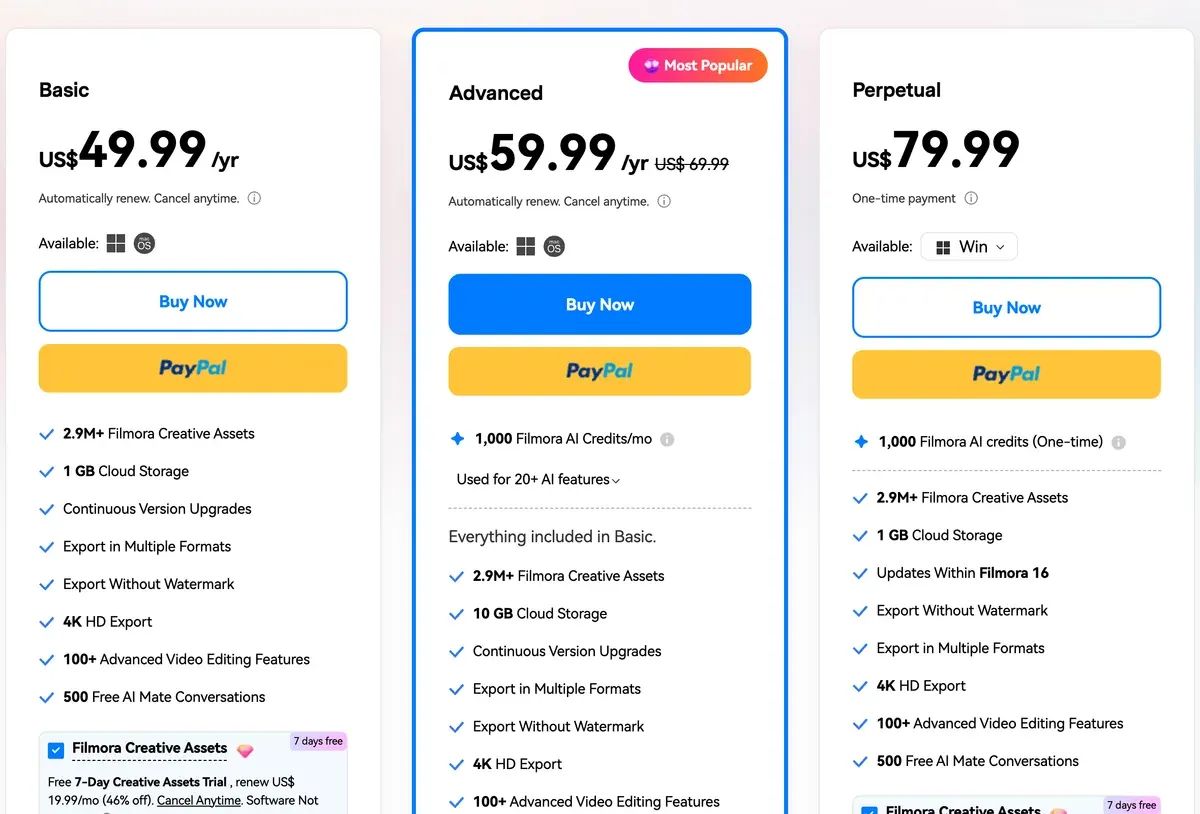
Filmora sells cheaper yearly plans and a one-time licence. CapCut’s Pro costs three times as much a year and carries 200 more AI credits a month.
CapCut’s pricing page shows a local currency, so its US prices come from an archived copy of the US page and the US App Store. Filmora’s US prices come from its shop page and Team page, checked .
| Plan | Billing | Price (USD) | AI credits |
|---|---|---|---|
| CapCut Standard, mobile apps only | Monthly | $9.99 | None |
| CapCut Pro | Monthly | $19.99 | 1,200 a month |
| CapCut Pro | Yearly | $179.99 | 1,200 a month |
| CapCut Ultra | Monthly | $79 | 8,645 a month |
| CapCut Teams, per seat, 2 seats | Monthly | $12.49 | 1,200 a seat |
| Filmora Basic | Yearly | $49.99 | None |
| Filmora Advanced | Yearly | $59.99 | 1,000 every 30 days |
| Filmora Perpetual | Once | $79.99 | 1,000 once |
| Filmora Team, per user | Yearly | $155.88 | None |
Scroll sideways for all 4 columns
A year of CapCut Pro costs three times Filmora Advanced. The gap buys CapCut’s phone and web apps and 200 more AI credits a month.
Filmora’s Perpetual licence gets updates within Filmora 16 only. Its 1,000 AI credits come once, with “Permanent validity” on the credit rules page.
Every plan in detail: CapCut pricing and Filmora pricing.
Which AI tools does each have for ad work?
Both put AI inside a timeline editor and bill the generated parts in credits. CapCut’s auto captions are free; Filmora charges 4 credits a minute for speech to text.
CapCut’s AI video generator page lists Dreamina Seedance 2.0, 2.0 Mini and 2.5, Sora 2 and Veo 3.1 for clips. The US Pro card states up to 240 seconds at 720p of Seedance 2.0 Mini a month. A credit bought on its own costs one US cent (credits help).
Filmora’s image-to-video tool runs Seedance 2.0, Sora 2 and Veo 3.1. A Veo 3.1 text-to-video clip costs 450 credits (credit rules). Translation with lip sync costs 21 credits a minute on the PC credit table.
Subscription credits last about a month on both. Filmora’s arrive every 30 days, and the next batch takes back any you have not used. CapCut’s last one subscription month. Credits bought directly on CapCut Online stay in the account indefinitely unless stated otherwise (credit rules, 23 March 2026).
Generated clips burn credits on both. On CapCut, AI tools use up credits on failed or wrong results in 8 of 64 user sources (Trustpilot, Trustpilot). Filmora’s credits run short for generated clips in 3 of 4 review sources (G2, Trustpilot).
How to build a whole ad from CapCut’s AI tools: CapCut AI video generator.
Desktop, phone or browser?
CapCut runs on web, Windows, macOS, iOS and Android under one account. Filmora is a Windows and Mac app with a separate phone app.

That app, “Filmora: AI Video Editor&Maker” on the App Store, was FilmoraGo. Its iPhone page lists AI Captions, AI Remover and Text to Speech among its tools. It does not say whether a desktop plan covers it.
For a creator who films and edits on the same phone, CapCut keeps the project in one place. An editor at a desk can cut long founder interviews into shorts with Filmora’s Smart Short Clips. It costs 6 credits a minute (credit table).

Which ads do their terms let you run?
Both let your own footage run in paid ads. Both restrict their own music, and their rules differ on stock and AI output.
CapCut’s Materials License Agreement (22 January 2026) treats templates, stock clips, stickers and fonts as personal use unless marked “commercial use”. One unmarked asset makes the whole video non-commercial (section 2).
Permitted uses of your content incorporating Dual Use Materials only
in digital form, as promotional, marketing or advertising materials for goods or services on e-commerce platforms, provided that such content must not be used to endorse authenticity, legality, quality or other aspects of the products or services; and as promotional, marketing or advertising materials for distribution via other online media.
if the content you create on the Platform incorporates both Dual Use Material and Non-commercial Use Material, you can only use such content for the personal and non-commercial use, but not for any commercial use or purpose.
Commercial Sounds may be shared “within CapCut, TikTok and TikTok for Business” (section 3).
Commercial Sounds
Commercial Users may show or share their video that includes a Commercial Sound within CapCut, TikTok and TikTok for Business (“Permitted Plaforms”). Any uses of Commercial Sounds outside of the Permitted Platforms require you to obtain separate permission and license the necessary rights directly from all necessary rights holders.
Section 4 bars CapCut materials in ads for supplements, healthcare and pharmaceutical products.
Commercial-marked materials also “must not be used to endorse authenticity, legality, quality or other aspects of the products or services” (section 2). A stock clip cannot stand in for proof that your product works.
Wondershare’s EULA asks individual plans for a credit line: “If you have purchased an individual plan and want to use Filmora for commercial purpose, you must indicate, “Video is made by Filmora” in your video description.” The Team plan drops that line. Built-in music and sound effects stay barred on every plan.
License for individual
all the music tracks and sound effects built in Filmora shall not be used for any commercial purpose.
If you have purchased an individual plan and want to use Filmora for commercial purpose, you must indicate, “Video is made by Filmora” in your video description.
| Ad element | CapCut | Filmora |
|---|---|---|
| Your own footage | Allowed on every plan | Allowed on paid plans, with the credit line on individual plans |
| Templates and stock | Only assets marked “commercial use” | Built-in effects, stickers and fonts need explicit permission (support FAQ) |
| Library music | TikTok and CapCut only (Commercial Sounds) | Barred, Team plan included |
| AI music | Not named in the terms or the licence | Allowed when labelled “Commercially available” |
| Generated AI clips | No ownership rule; third-party models follow their providers’ terms | Support FAQ: personal or non-commercial only |
Scroll sideways for all 3 columns
AI-generated resources labeled “Commercially available,” such as AI Music, are suitable for commercial use.
… for non-commercial use due to uncertainties in the commercial status of their training materials.
Filmora’s own pages disagree on AI clips. Its support FAQ restricts “all other AI-generated materials” to “personal/non-commercial use only”. Its AI video generator page answers “Commercial use is allowed, but check platform rules”.
CapCut’s terms (15 April 2026) say “We don’t own your User Content”. The same section 10 grants CapCut a perpetual, sub-licensable licence to it, and to your likeness in sponsored content.
Clause by clause: CapCut and Filmora in the AI commercial use matrix.
Charges after cancelling top CapCut’s complaints and tie for first on Filmora’s
CapCut’s app-store reviewers find the editor easy to learn. Its recent Trustpilot reviews are almost all complaints, led by charges after cancelling.
On CapCut, 64 public sources from 16 September to 15 November 2026:
- Charges after cancelling or a free trial, with refunds refused (10 of 64 sources: Trustpilot, Trustpilot)
- Tools that were free now sit behind Pro, often found at export (8 of 64 sources: Trustpilot, App Store)
- Easy to learn, for beginners and small businesses (5 of 64 sources: Trustpilot, App Store)
On Filmora, 4 review pages read on 25 October 2026:
- Quick to learn, on modest hardware (3 of 4 sources: G2, Capterra)
- Auto-renewals without a clear warning, and refused refunds (3 of 4 sources: Trustpilot, G2)
- AI credits run short for generated clips (3 of 4 sources: G2, Trustpilot)
More on each: the CapCut profile and the Filmora profile.
If neither fits
For a video built from a product link with an AI presenter, Pippit is ByteDance’s commerce sibling of CapCut, under the same CapCut terms. For avatar ads with a published rate, Creatify Standard costs $15 a month. A 30-second avatar video works out at $2.73 if every credit is used (pricing, checked ).
Every replacement by job: CapCut alternatives. Design-first editing against CapCut: Canva vs CapCut.
Questions buyers ask about CapCut and Filmora
Is Filmora better than CapCut?
For a one-time desktop licence and cheaper yearly plans, Filmora. For free, watermark-free exports on every device you edit on, CapCut.
Is CapCut free for commercial use?
For your own footage, yes, on the free plan. Templates and stock need the “commercial use” mark, and CapCut’s Commercial Sounds stay on TikTok and CapCut.
Does Filmora have a free version without a watermark?
No. The free edition edits and exports, and Wondershare’s shop page says “watermarks will be added to the exported files”.
Sources
- CapCut: CapCut pricing, serves a local currency by visitor location; the Pro, Ultra and Teams cards and the 7-day Pro trial line in its FAQ. Checked
- CapCut, via the Wayback Machine: CapCut pricing, US page (archived copy of 8 November 2026), region US, currency USD; Pro, Ultra and Teams prices, 1,200 monthly AI credits on Pro and the Seedance 2.0 Mini seconds line. Checked
- Apple: CapCut on the US App Store, in-app purchases, with the Standard Monthly Subscription; 4.6 from about 1,127,000 ratings. Checked
- CapCut help centre: Credits in CapCut, 25 March 2026; one credit equals one US cent. Checked
- CapCut help centre: Is it possible to export videos from CapCut without a watermark?, 18 March 2026; a watermark comes only from a template outro or a branded stock asset. Checked
- CapCut: CapCut AI video generator, the models listed: Dreamina Seedance 2.0, 2.0 Mini and 2.5, Sora 2 and Veo 3.1. Checked
- CapCut: CapCut Materials License Agreement, last updated 22 January 2026; sections 1 to 4 on Dual Use Materials, Commercial Sounds and barred product categories. Checked
- CapCut: CapCut Terms of Service, last updated 15 April 2026; section 10 on User Content and third-party AI services. Checked
- Wondershare: Filmora pricing and plans, Basic, Advanced and Perpetual cards; the free edition’s watermark line. Checked
- Wondershare: Filmora Team and Business plans, Team, priced per user a year, for 1 to 5 users, with no AI credits. Checked
- Wondershare: Instructions on AI credits rules, credits issued every 30 days and taken back at the next batch; Veo 3.1 and Sora 2 rates. Checked
- Wondershare support: What are the AI credit consumption rules for Filmora PC?, 4 credits a minute for speech to text, 21 for translation with lip sync, 6 a minute for Smart Short Clips. Checked
- CapCut help centre: How long are CapCut credits valid?, subscription credits last one subscription month; purchased credits two years. Checked
- Apple: Filmora: AI Video Editor&Maker, the US App Store listing of Filmora’s mobile app, formerly FilmoraGo. Checked
- Wondershare: Filmora Mobile for iPhone, the mobile app’s AI tools, from AI Captions to AI Voice Cloning. Checked
- Wondershare: Wondershare End User License Agreement, undated; the credit line for individual plans, built-in music and the generative AI terms. Checked
- Wondershare support: Can built-in effects be used for commercial purposes?, AI music cleared for commercial use; other AI-generated material personal or non-commercial only; built-in music, effects, stickers and fonts need explicit permission. Checked
- Wondershare: Filmora AI video generator, its FAQ says commercial use of AI videos is allowed. Checked
- CapCut: CapCut Auto Caption Generator, captions from speech free of charge, in multiple languages. Checked
- Trustpilot and the US and UK App Store: CapCut user reviews, 64 public sources from 16 September to 15 November 2026, synthesised on 15 November 2026. Checked
- G2, Capterra, Trustpilot and TechRadar: Filmora user reviews, 4 review pages, synthesised on 25 October 2026. Checked
- Creatify: Creatify pricing, Standard plan credits and the avatar video rate. Checked

Alexandre S.
Alexandre S. is a creative ad strategist and copywriter with ten years' experience in digital marketing across multiple channels.
Related pages
-
 Category Best AI video generators for ads
23 AI video generators and model shops compared on cost per clip and ad-use terms, checked 25 September 2026.
-
 Profile CapCut for ads
CapCut edits your own footage into ads for free, but its templates and music carry ad limits. The licence clauses and user reports, read 15 Nov 2026.
-
 Pricing CapCut pricing
CapCut is free; Pro costs $19.99 a month or $179.99 a year in the US with 1,200 AI credits. Standard, Teams, the trial and cancelling, checked 15 Nov 2026.
-
 Alternatives CapCut alternatives
Six CapCut alternatives sorted by ad job, from desktop editing and template ads to AI presenters, with prices and ad licences checked 15 Nov 2026.
-
 Profile Filmora AI for ads
Filmora’s support FAQ restricts every AI output but labelled music to non-commercial use. What each AI tool costs in credits, terms read 25 October 2026.
-
 Pricing Filmora pricing
Filmora costs $49.99 a year for Basic or $59.99 for Advanced with 1,000 AI credits a month; the perpetual licence is $79.99 once. Checked 12 Nov 2026.


