Video ad templates come from four places. Envato Elements and Motion Array sell them for After Effects, Premiere Pro, DaVinci Resolve or Final Cut Pro; CapCut and Canva keep theirs inside their own apps. Each is a ready-made project file with the cuts, text animations and transitions built, so you drop in your own footage, product shots and words.
Envato Elements templates open in After Effects, Premiere Pro, DaVinci Resolve, Final Cut Pro or Apple Motion. CapCut and Canva templates open only inside their own apps.
The licence matters more than the look once the template becomes an ad. Envato licenses each download for one project. Motion Array lets a download run in any number of projects while you subscribe.
Four places to get a video ad template: what the licence allows in an ad, the entry price, and the app each one needsScroll sideways for all 4 columns
Source
Licence for an ad
Entry price
Opens in
Envato Elements
One licence per project (clause 4)
$16.50 a month billed yearly
After Effects, Premiere Pro, DaVinci Resolve, Final Cut Pro, Apple Motion
CapCut
Only items marked “commercial use”, with nothing unmarked mixed in (Materials 2)
Free; Pro $19.99 a month
CapCut
Canva
A design for a client needs “a written agreement” with that client (4A)
After Effects, Premiere Pro, DaVinci Resolve, Final Cut Pro
Scroll sideways for all 4 columns
Which editor does each template need?
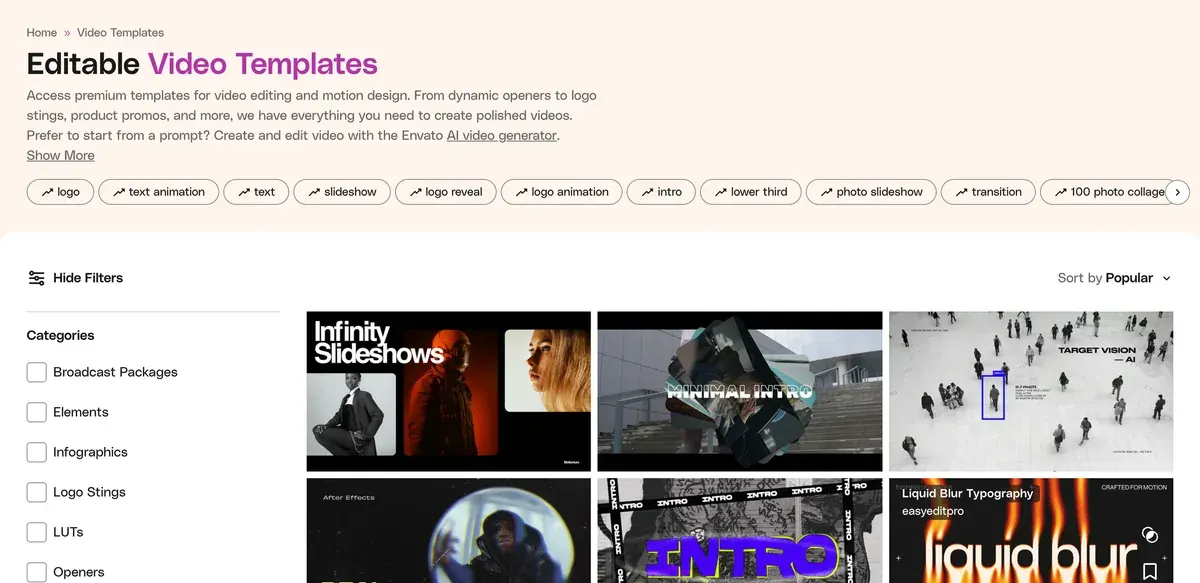
Envato’s video templates page filters by five editors: After Effects, Premiere Pro, DaVinci Resolve, Final Cut Pro and Apple Motion. CapCut is not among the editor filters. The Product Promo category is the closest to ad work.
So the template you buy follows the editor you already use. Motion Array’s help page says its templates “can’t be edited on our website”: each needs its own desktop app.
If you cut ads in CapCut, an After Effects template is a file you cannot open. Envato’s stock clips and music are separate video and audio files, which any editor can import. CapCut’s own template library sits inside the app, as does Canva’s.
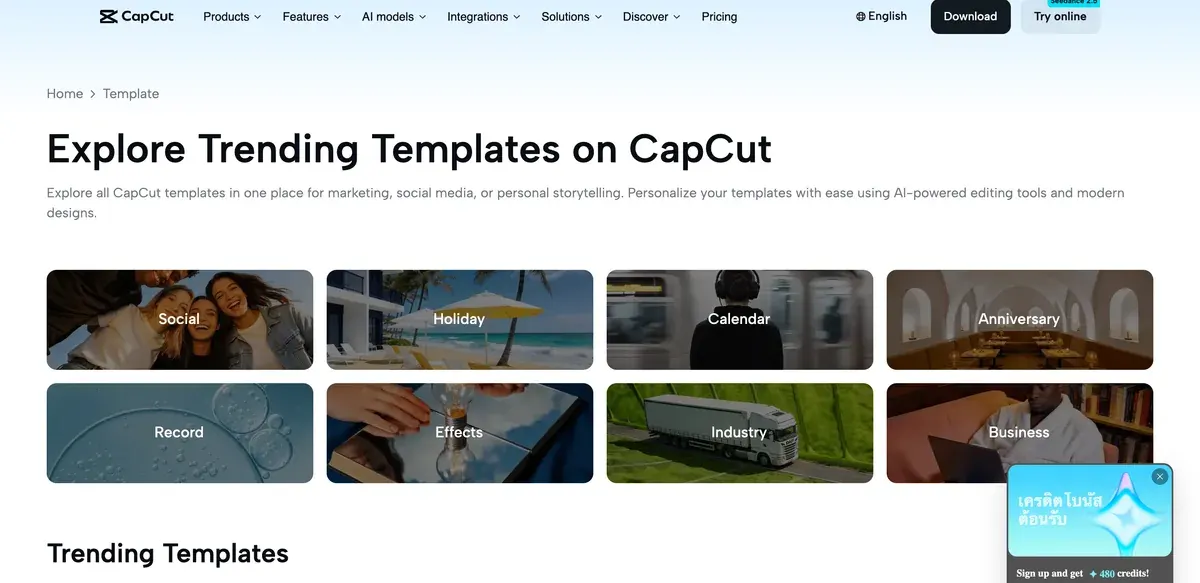
CapCut’s template library groups templates by use, from social to businessCapCut templates library, captured
How to turn a template into a 9:16 ad
Pick it by its first three seconds. Scrub the preview and check that the product or the first line of text lands inside that window. Envato has no aspect-ratio filter on templates, so a 16:9 one needs reframing to vertical 9:16 before it can fill a phone screen.
Swap the placeholders for product footage or an AI clip. Your own phone footage works in any template. Envato’s own video generator makes clips of up to 8 seconds. A 4-second clip uses 2, 5 or 9 credits by resolution (AI tools FAQ). On Plus that is $0.39 to $1.76 a clip. Envato keeps ownership of that output: you get a licence, and Envato can license the same clip to other users (AI Product Terms 10, 18).
Rights to Output and Output License
10. Rights to Output As between you and Envato, Envato, its licensors, and Group Companies retain all right, title and interest in and to the GenAI Tools and the Output, and grants you a license to use the Output as set out in clause 15. For clarity, no rights in the Output are assigned to you, except in respect of any embedded portions of your Input, and only to the extent that you hold pre-existing rights in that Input.
15(a)(i) General Output License Excluding Output generated by Envato’s Music Generator, for Output generated using Envato’s GenAI Tools, you are granted a non-exclusive, commercial, worldwide, royalty-free and perpetual license to use, modify and reproduce the Output generated by you, provided it is incorporated with other content and/or elements to create a new work that is larger in scope and different in nature than the Output itself (this new work being an End Product).
Replace the music with a track licensed for the placement. CapCut’s Commercial Sounds are licensed for CapCut, TikTok and TikTok for Business only (Materials section 3). The Meta cut of the same ad needs music from elsewhere. Envato’s music is licensed per project, and clause 14 bars its broadcast use, streaming TV included.
Export to the platform’s spec (Meta Reels specs, TikTok In-Feed specs). The table below has both. For Reels, keep text out of the top 14%, the bottom 35% and 6% on each side. TikTok sets its safe zone by the video’s dimensions instead of one fixed box.
Register the licence to the client’s project. On Envato, each download creates a licence stamped with its date. Click Manage to give it the project’s name, and create a new licence for the same template in every new project (Envato help). Download the licence certificate as a PDF: Envato’s help page names it as proof for a YouTube Content ID claim.
Elements License, clause 4
Use for a Specific Project This license grants you a non-exclusive, commercial, worldwide and revocable right to use the Item for: a. Use for a Specific Project - use of the Item in one project to create a specific End Product
Envato’s own licence wording (Elements License, last revised 6 October 2026, read 12 November 2026): the licence is per project, for one End Product.Envato, Envato Elements License, clause 4,
Export settings for a 9:16 video ad on Instagram Reels and TikTok In-FeedScroll sideways for all 3 columns
Envato’s clause 10(a) lets you hand a finished ad to a client “as long as” your “subscription remains active”. The client’s sublicence bars extracting the template or its footage. Clause 6(a) defines the finished product for a template as “a customized implementation of the Item”, so your edited version is the licensed product.
Motion Array allows client work on any plan, provided you are the only person using the account (client use). A company of over 50 employees needs its Business licence.
CapCut’s licence for paid materials runs per exported video. Its Materials License Agreement says a re-edit of an exported video that uses paid material, “even a very minor edit”, means paying for that material again.
CapCut Materials License Agreement, section 2
Dual Use Materials only in digital form, as promotional, marketing or advertising materials for goods or services on e-commerce platforms, provided that such content must not be used to endorse authenticity, legality, quality or other aspects of the products or services; and as promotional, marketing or advertising materials for distribution via other online media.
Mixed content if the content you create on the Platform incorporates both Dual Use Material and Non-commercial Use Material, you can only use such content for the personal and non-commercial use, but not for any commercial use or purpose.
A template is an edit. It does not pick the audience, the offer or the angle, and it ships one opener, so it never tells you which hook wins. That takes several variants run against each other, the job of the testing framework.
Broken templates, or templates missing assets shown in the preview, come up in 4 of 45 Envato review sources, among them two Trustpilot posts (28 August 2026, 30 October 2026). Three sources call much of the music and template catalogue generic: the same August post, Trustpilot, 20 October 2026 and an r/envato thread.
What the template libraries cost
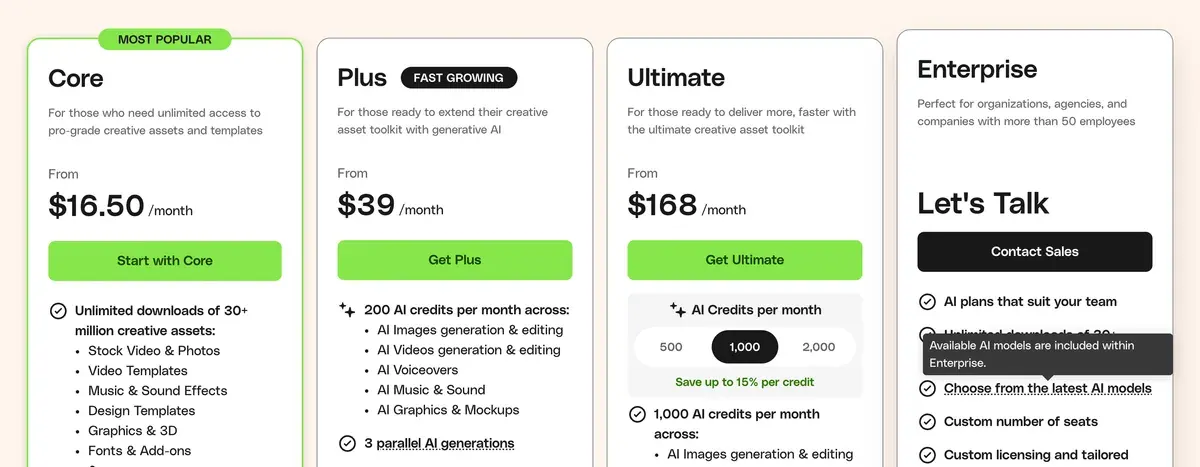
Envato Core lists $16.50 a month billed yearly, with unlimited downloads from the whole library. Plus lists $39 a month billed yearly and adds 200 AI credits a month. Full plans are on Envato pricing.
Envato’s pricing page lists Core, Plus, Ultimate and Enterprise with yearly From prices and the AI credits each includesEnvato Elements pricing page, captured
Envato’s Cyber Sale runs until Tuesday 1 December 2026 at 10:00 UTC. It takes 25% off yearly Core and 15% off Plus and Ultimate for the first 12 months (pricing page).
CapCut’s templates start on its free plan, and premium templates come with Pro at $19.99 a month (CapCut profile). Canva sells Pro on Canva pricing, and Motion Array its paid plans on Motion Array pricing.
If you edit in CapCut or Canva, Envato’s templates do not open, though its stock clips and music import as plain video and audio files. Envato alternatives lists the libraries that fit other editors, and Envato vs Magnific compares the two stock-plus-AI plans.
Questions about video ad templates
Can I use Envato video templates in paid ads?
Yes, one licence per ad project. Clause 4 asks for a new licence each time the same template goes into a separate project.
Can I use CapCut templates in Facebook ads?
Only templates whose every element carries CapCut’s “commercial use” mark. One unmarked sticker or font makes the whole video personal use (Materials section 2).
Do I need After Effects to use Envato templates?
For After Effects templates, yes. Envato also lists templates for Premiere Pro, DaVinci Resolve, Final Cut Pro and Apple Motion.
Sources
Envato: Envato Elements video templates, compatibility filters for After Effects, Premiere Pro, Apple Motion, Final Cut Pro and DaVinci Resolve; categories including Product Promo, Openers and Titles; resolution filters; no aspect-ratio filter and no CapCut filter. Checked
Envato: Envato Elements License, last revised 6 October 2026; clause 4 (a licence per project, a new licence for each end use), 6(a) (a template’s End Product is a customised implementation), 10(a) (client sublicence while the subscription is active), 14 (no broadcast use of music, streaming TV included). Checked
Envato Help Center: How to Create a New License on Envato, a licence is created at download and stamped with its date; Manage assigns it to a project name; no re-download needed for a new project’s licence. Checked
Envato Help Center: Envato item license certificate, a PDF that confirms a licence for a specific item in a specific project, usable as proof for a YouTube Content ID claim. Checked
Envato: Envato AI Product Terms, last revised 1 July 2026; clause 10 keeps the Output with Envato and assigns no rights in it, clause 18(f) lets Envato license Output to other users. Checked
Envato Help Center: Envato AI Tools FAQs, videos run up to 8 seconds; Low (480p+), Standard (720p+) or High (1080p+); a 4-second video uses 2, 5 or 9 credits. Checked
Envato: Envato Elements pricing, Cyber Sale: 25% off yearly Core, 15% off yearly Plus and Ultimate for the first 12 months, new and returning subscribers; offer ends Tuesday 1 December 2026, 10:00 UTC. Checked
CapCut: CapCut Materials License Agreement, last updated 22 January 2026; section 1 marks commercial materials, section 2 makes mixed marked and unmarked content non-commercial, section 3 limits Commercial Sounds to CapCut, TikTok and TikTok for Business; a re-edit of exported content that uses paid Platform Material means paying for that material again. Checked
Motion Array Help Center: What Software Will I Need In Order Use Your Templates?, After Effects, Premiere Pro, DaVinci Resolve and Final Cut Pro templates each need that editor; templates cannot be edited on the website. Checked
Motion Array Help Center: How Does The License Work?, downloads usable in as many projects as you like while you pay; finished work keeps running after you cancel. Checked
Motion Array Help Center: Does the license cover client use?, client work allowed on any plan if stand-alone assets are not handed over and you are the only user of the account; companies of over 50 employees need a Business licence. Checked
Meta Ads Guide: Instagram Reels video ad specs, 9:16 at 1440 x 2560, MP4 or MOV, 4GB, 0 seconds to 15 minutes, primary text 44 characters, 14% top, 35% bottom and 6% side margins free of text. Checked
TikTok Ads Manager: TikTok Auction In-Feed Ads, last updated June 2026; non-Spark vertical 9:16 at 540 x 960 or more, .mp4, .mov, .mpeg, .3gp or .avi, 500 MB or less, 516 kbps or more, up to 10 minutes; the safe zone is set by the dimension. Checked
Trustpilot: Envato reviews, 45 public reviews and threads synthesised in the site’s Envato review file. Checked
Alexandre S.
Alexandre S. is a creative ad strategist and copywriter with ten years' experience in digital marketing across multiple channels.
Envato licenses your AI output and may license it to others; Artlist assigns you whatever rights it holds. Stock, AI credits and prices, checked 12 Nov 2026.
CapCut’s AI video maker turns a script into scenes, a voice and captions. The plan each tool needs, steps for a 20-second ad and the ad rules, 15 November 2026.
adtestbench counts visits with Google Analytics cookies. Privacy and cookies



 Compare Artlist vs Envato
 Best list AI B-roll generators
 Guide UGC script template for ads
 Guide CapCut AI video generator for product ads


