Submagic for captions on short videos
Verdict on Submagic
Worth it if you caption and polish short talking-head videos every week. Starter at $19 a month makes 15 captioned videos of up to 2 minutes, $1.27 each if every credit is used (read on ). The catch is long recordings: uploads stop at 2 minutes on Starter and at 30 minutes on Business.
Submagic
- Best for
- Creators and small teams who caption and polish talking-head shorts every week and want b-roll, zooms, silence removal and social publishing in one editor.
- Not for
- Teams clipping hours of long video a month: Starter caps uploads at 2 minutes, and a Magic Clips run costs 8 credits, so 45 credits give 5 runs.
| Made by | TURBO STUDIO S.A.S. |
|---|---|
| Category | All-in-one suites |
| Makes | Animated auto captions on uploaded videos, in 118 languages (page structured data), with caption templates, emojis and keyword highlights; Magic Clips: long video (upload or YouTube link) to short clips, 8 credits a run; caption translation into 100+ languages (in-app announcement text); auto b-roll (stock, Storyblocks on Pro and Business, movie clips), auto zooms, sound effects and music; silence, filler-word and bad-take removal; clean audio; AI eye-contact correction; AI hook titles and descriptions; AI Actors and AI thumbnails (thumbnail: 1 credit each, page source); publishing and analytics for social accounts (Pro and Business), with scheduling; REST API (projects, Magic Clips, export, publishing) and an MCP server |
| Entry price | From $19 a month |
| Cost per output | $1.27 to $3.38 per captioned video at list price, if every credit is used; up to 2 minutes. Method |
| Use in ads | The clauses, quoted and dated: What Submagic’s terms allow in ads. |
| Free plan | Yes |
| Free trial | A 3-day trial of a paid plan (for 3 days, then), offered once, before a first subscription ( This offer is only available before your first subscription); strings in the pricing page source, 16 November 2026. |
| Languages | Captions in 118 languages (pricing page structured data); caption translation into 100+ languages; API docs say transcription in 100+ languages |
| API | Yes |
| Status | Active |

What Submagic does
Submagic is a web editor that dresses up short vertical videos for TikTok, Reels and YouTube Shorts. You upload a clip of someone talking, and it adds captions, cuts and b-roll for you.
The main one is captions: animated subtitles timed to each spoken word, with emojis and key words picked out in colour. The pricing page lists captions in 118 languages.

Around the captions, Submagic cuts and decorates the video. On Pro and Business, it removes silences, filler words and bad takes and adds automatic zooms; Starter trims by editing the transcript text. Every paid plan lays b-roll (cutaway footage shown over the speaker), and Pro and Business draw it from Storyblocks (pricing page).

Its Magic Clips feature also does clipping: cutting a long video into short clips.

The Magic Clips API reference takes a YouTube link and bills 8 credits a project. It makes clips of 15 to 300 seconds, with 60 as the default maximum.
Pro and Business publish and schedule to connected social accounts. Every paid plan includes some API minutes, and the API docs add an MCP server, so an AI assistant can send jobs.
For a brand, the job it fits is the founder clip or the UGC-style ad that needs captions, cuts and b-roll before it runs.
What Submagic costs
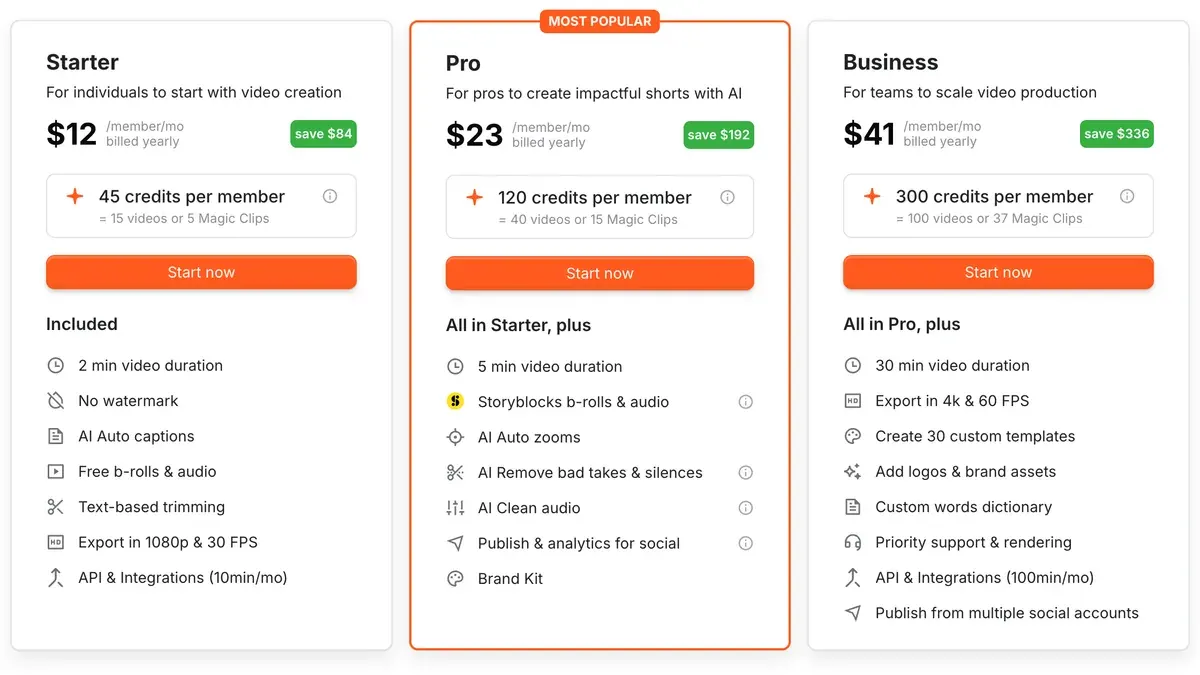
Submagic sells credits per member per month: 45 on Starter, 120 on Pro and 300 on Business. Each plan card converts the credits: on Starter, 45 credits equal 15 captioned videos or 5 Magic Clips runs (Submagic pricing). That is 3 credits a video, and the API reference bills a Magic Clips project at 8.
| Plan | Monthly price (USD) | Billed yearly, per month (USD) | Cost per captioned video (USD) | Billed yearly, per month (USD) |
|---|---|---|---|---|
| Free | Free | Not published | Not computed | Not published |
| Starter | $19 | $12 | $1.27 to $3.38 | $12 |
| Pro | $39 | $23 | Not computed | $23 |
| Business + API | $69 | $41 | Not computed | $41 |
| Custom | Not published | Not published | Not computed | Not published |
Scroll sideways for all 4 columns
- Free
- What you get: Editing with a Submagic watermark on exports (
Submagic watermark
,Choose a plan to export without it
) - Notes: The pricing page lists no Free card. Free limits (videos, length) are not published; the page source holds
Your video is too long for the free plan. Upgrade to upload videos up to 30 min.
- Starter
- What you get: 45 credits per member a month (
= 15 videos or 5 Magic Clips
), videos up to 2 minutes, 1080p at 30 FPS, no watermark, AI auto captions, standard caption templates and b-roll, text-based trimming, API 10 min a month - Notes: Structured data on the page: 19 a month, 144 a year (12 a month,
save $84
). Priced per member. No custom templates, no social publishing. - Pro
- What you get: 120 credits per member a month (
= 40 videos or 15 Magic Clips
), videos up to 5 minutes, 1080p or 2K at 30 FPS, no watermark, Storyblocks b-roll and audio plus movie clips, auto zooms, silence and bad-take removal, clean audio, publishing with 1 profile per platform, 3 custom templates, brand kit, API 10 min a month - Notes: 276 a year (23 a month,
save $192
), per member. MarkedMost popular
. - Business + API
- What you get: 300 credits per member a month (
= 100 videos or 37 Magic Clips
), videos up to 30 minutes, 4K at 60 FPS, 30 custom templates, logos and brand assets, custom vocabulary, priority support and rendering, publishing with 3 profiles per platform, API 100 min a month - Notes: 492 a year (41 a month,
save $336
), per member. The card heading readsBusiness
; the table and structured data readBusiness + API
. - Custom
- What you get: Custom videos a month, minutes per video, members, Magic Clips limits and API limits; unlimited custom templates, dedicated customer success, SSO
- Notes:
Contact sales
. No price shown.
Source: submagic.co/pricing
$1.27 to $3.38 per video at list price on Starter at $19 a month, if every credit is used. Starter billed monthly: 19 dollars / 15 videos (45 credits at 3 credits a video, stated on the card) = 1.27 dollars a captioned video of up to 2 minutes; billed yearly, 12 / 15 = 0.80. A Magic Clips run (long video to several clips) costs 8 credits (API docs, magic-clips endpoint): The pricing card counts 45 credits as 5 Magic Clips runs on Starter and 120 as 15 on Pro, so a run costs 19 / 5 = 3.80 dollars on Starter monthly and 39 / 15 = 2.60 on Pro monthly. The card does not say how many clips one run returns. Extra API minutes are sold in monthly packs from 57 dollars for 250 minutes (0.23 a minute) down to 0.10 a minute at 5,000 minutes or more.
The video length cap matters more than the credits. Starter takes videos up to 2 minutes, Pro up to 5 and Business up to 30 (Submagic pricing). A 45-minute webinar upload fits no listed plan, and Custom has no published price. The Magic Clips API takes a YouTube link instead, and its reference states no source-length limit.
On Starter at $19 a month, a captioned video costs $1.27 if all 45 credits are used. Starter’s 45 credits buy 5 Magic Clips runs, so a run costs $3.80. Pro’s 120 credits buy 15, at $2.60 each (Submagic pricing). The card does not say how many clips one run returns.
Yearly billing cuts each plan by 37 to 41 per cent: Starter becomes $144 a year. Extra API minutes come in monthly packs, from $57 for 250 minutes (Submagic pricing).
The pricing page lists no Free card and no Free limits. Strings in the page’s source describe a free tier for editing, with a Submagic watermark on exports. A 3-day trial of a paid plan is offered once, before your first subscription.
Article 12 of the terms makes every monthly and annual fee non-refundable, apart from the 14-day consumer withdrawal right. Plans are priced per member, so a team of three pays three times.
What Submagic’s terms allow in ads
Submagic’s terms are the Terms of Use and Sale of TURBO STUDIO S.A.S., with no date on the page. No article limits commercial or advertising use by plan. No article hands you the edited outputs either.
Article 13 says “You retain all rights to the Content you submit”, and Content there means what you upload. So your footage stays yours. The same article adds that “results generated by the Platform may not be unique” and that “The Customer assumes full responsibility for the use of AI-generated results.”
Two more lines matter before a clip runs as an ad:
- Article 13 grants TURBO STUDIO “a worldwide, non-exclusive license” to your uploads, including promotional use. To opt out, you email support@submagic.co.
- Article 11 lets it change subscription prices “with reasonable prior notice”, and continued use accepts the new price.
The terms do not say which licence covers the Storyblocks b-roll on Pro and Business. Check that stock clip’s rights before a paid campaign. Platform rules for vertical ads are in the TikTok ad specs and YouTube Shorts ads guides.
Is Submagic legit?
Submagic belongs to TURBO STUDIO S.A.S., a registered company (article 2.1 of its terms) that publishes full terms and an API. On 16 November 2026 its Trustpilot page showed 864 reviews, a TrustScore of 4.5, 87% five stars and 7% one star.
We read the 20 most recent Trustpilot reviews, 23 September to 14 November 2026, plus G2’s archived score. Support leads the praise. Seventeen of the 20 Trustpilot reviews say it answers fast and fixes problems, often naming the same staff (Trustpilot, Trustpilot).
Fewer talk about the editor itself. Four say it saves editing time on captions and social clips (Trustpilot, Trustpilot).
The complaints are about money. Three of 20 report charges they did not expect, such as repeat charges around cancellation or payment demanded before cancelling (Trustpilot, Trustpilot). With article 12 ruling out refunds after the 14-day withdrawal right, cancel a trial before it converts.
Submagic pros and cons
Pros
- Animated captions in 118 languages (pricing page)
- Silence and bad-take removal, auto zooms and clean audio from Pro up (pricing page)
- Support answers fast and fixes problems (17 of 20 Trustpilot reviews: Trustpilot, Trustpilot)
- Saves editing time on captions and social clips (4 of 20 Trustpilot reviews: Trustpilot, Trustpilot)
- API minutes on Starter, Pro and Business, plus an MCP server (API docs)
Cons
- Uploads capped at 2 minutes on Starter and 30 on Business (pricing page)
- Unexpected charges around upgrades and cancellation (3 of 20 Trustpilot reviews: Trustpilot, Trustpilot)
- Every fee non-refundable once paid, apart from the 14-day consumer withdrawal right (terms, article 12)
- Priced per member, so each seat pays the full plan
- No clause on who owns the edited outputs (terms, article 13)
When Submagic is the wrong pick
Submagic is the wrong pick when you upload an hour-long podcast, webinar or stream, since uploads stop at 30 minutes. Clipping tools take the whole recording and bill by the clip or by the source minute.
Klap bills per clip, whatever the source length up to 3 hours. Basic at $29 a month makes 100 clips a month, $0.29 each if all are used (Klap pricing). Its plans and the API are on the Klap profile.
OpusClip bills 1 credit per minute of source video. Pro at $29 a month buys 300 credits, so a 60-minute recording costs $5.80 if every credit is used (OpusClip pricing). The Klap vs OpusClip comparison sets the two side by side.
For hand editing on a timeline, CapCut has a free plan (CapCut for ads). Every clipping tool we track, by reader job, is on the AI clipping tools list.
- All-in-one suites
Klap
AI clipper that turns long videos into captioned 9:16 shorts, billed per clip, with scheduling and a per-use API.
From $29 a month · checked
Best for Creators and agencies cutting many shorts from long videos (up to 3 hours each) who want a fixed clip count whatever the source length.
- All-in-one suites
OpusClip
AI clipper billed per source minute: long video to captioned shorts with reframing, AI b-roll, scheduler and an API.
From $15 a month · checked
Best for Creators and small teams clipping long videos who want AI b-roll, Premiere or DaVinci export, a multi-network scheduler and up to 4 seats on Pro.
- All-in-one suites
Vizard
AI clipping tool: long videos to captioned 9:16 clips, plus an editing agent, scheduling and a clipping API.
From $29 a month · checked
Best for Podcasters, coaches and marketers who clip long recordings into shorts every week and want reframing, captions, scheduling and an API on one credit balance.
Questions buyers ask about Submagic
Is Submagic free?
The pricing page lists no Free card; strings in the page’s source describe a free tier for editing, with watermarked exports. No Free limits are published. A 3-day trial of a paid plan is offered once, before a first subscription.
Submagic vs OpusClip: which costs less?
Submagic for short clips, OpusClip for long sources. A captioned short of up to 2 minutes costs $1.27 on Submagic Starter, and Submagic’s uploads stop at 30 minutes. OpusClip bills 1 credit per source minute, so an hour costs $5.80 on Pro.
Does Submagic have an API?
Yes. Starter and Pro include 10 API minutes a month and Business 100, and extra minutes come in monthly packs. API Magic Clips projects draw on account credits. The clipping API guide compares it with Klap’s and Vizard’s.
Can Submagic clip a long video?
Magic Clips cuts a long video into shorts at 8 credits a run, and the API version takes a YouTube link. Uploads stop at 30 minutes even on Business, and the API reference states no source-length limit for YouTube links. For long uploads, a clipping tool such as Vizard fits better.
Sources
- Submagic: Submagic pricing, the Starter, Pro and Business cards, credits per member, upload length per plan, the 3-day trial strings, API minute packs and the 118-language caption line. Checked
- TURBO STUDIO S.A.S.: Submagic Terms of Use and Sale, no date shown; articles 10, 11, 12 and 13. Checked
- Submagic docs: Magic Clips API reference, 8 credits a project, a YouTube link as input, clip length from 15 to 300 seconds with a 60-second default maximum. Checked
- Submagic docs: Submagic API introduction, the REST API for projects, Magic Clips, exports and publishing, and the MCP server. Checked
- Trustpilot: Submagic reviews, 864 reviews, TrustScore 4.5, 87% five stars and 7% one star; the 20 most recent read one by one, 23 September to 14 November 2026. Checked
- G2: Submagic reviews (archived copy), captured 6 December 2025; 4.7 from 83 reviews. Checked
- Klap: Klap pricing, Basic, Pro and Pro+ priced by clips a month. Checked
- OpusClip: OpusClip pricing, credits a month, 1 credit for each minute of source video. Checked

Alexandre S.
Alexandre S. is a creative ad strategist and copywriter with ten years' experience in digital marketing across multiple channels.
Related pages
-
 Category Best AI video generators for ads
23 AI video generators and model shops compared on cost per clip and ad-use terms, checked 25 September 2026.
-
 Profile Captions AI for ads
Captions sells iOS app plans; only its web terms name advertising. What 36 user reviews report and what an AI actor video costs, prices checked 1 October 2026.
-
 Guide YouTube Shorts ads
YouTube Shorts ads run through six Google Ads campaign types. Which one lets you pick Shorts, the specs and the Reel margin trap. Checked 7 November 2026.
-
 Guide Video size and specs for TikTok ads
Non-Spark TikTok In-Feed ads need 9:16 video at 540 by 960 or more, up to 500 MB. What sets the safe zone, and which AI tools export to spec. Checked 2 Oct 2026


