Creative testing template and tracker
The template is one row per test, and it works out the spend each variant needs before launch. Download the CSV (no sign-up, opens in Google Sheets or Excel). Column K shows the smallest CPA gap that spend can detect (formulas checked 2 October 2026). A row that cannot be read gets cut before it costs anything.
The ad templates on page 1 for this query log hypotheses and variants. In the page 1 results for this query (search of 2 October 2026), none of the snippets mention a sample-size rule for the budget. Google’s autocomplete also offers survey queries such as “creative testing questions”.
| Column | What to enter | Example | Formula |
|---|---|---|---|
| A Test ID | A short code that also starts each ad name | T01 | Typed |
| C Hypothesis | One sentence naming the change and the expected effect | A problem-first hook lowers CPA | Typed |
| D Variable | The one element that differs between variants | Hook | Typed |
| E Variants | How many versions run, 2 or more | 3 | Typed |
| F Expected CPA | Your recent cost per purchase or result | 30 | Typed |
| G Conversions per variant | The count you wait for before judging | 40 | Typed |
| H Spend per variant | What each variant must spend | 1,200 | =F*G |
| I Total spend | What the row commits | 3,600 | =E*H |
| J Pairs compared | Every head-to-head the row contains | 3 | =E*(E-1)/2 |
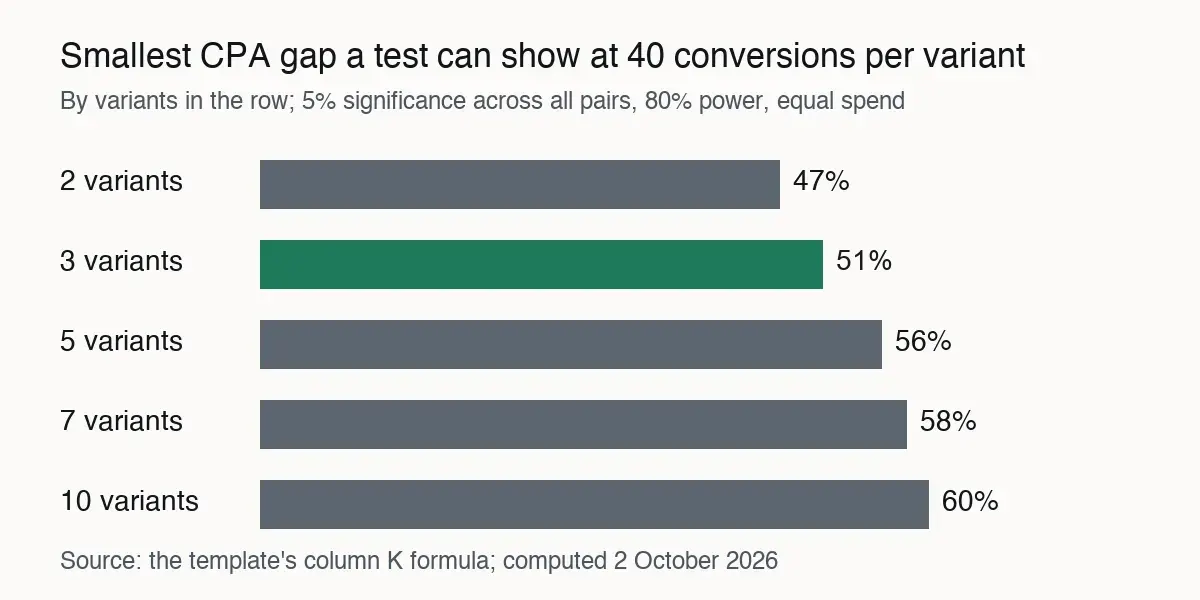
| K Smallest detectable CPA gap | The gap the row can reliably show | 51% | See the method below |
| M Stop rule | The end condition, fixed before launch | 40 conversions or 30 days | Typed |
| O to R Result | Best and runner-up CPA, the gap, and whether it clears K | 24, 31, 23%, Inside the gap | =1-O/P, then a comparison with K |
| S Decision | What the result changes next | Keep the current hook | Typed |
Scroll sideways for all 4 columns
Download the creative testing template
The file is creative-testing-template.csv: a header row, two marked example rows and 20 columns. In Google Sheets, use File, Import, Upload and keep “Convert text to numbers, dates, and formulas” ticked. In Excel, open the file directly. The formulas use only functions both spreadsheets share, so no macro or add-on is needed.
Columns H, I, J, K, N, Q and R compute. The rest you type. Replace both example rows before you plan anything with the sheet.
H  spend per variant
   = F x G
I  total spend
   = E x H
J  pairs compared
   = E x (E - 1) / 2
K  smallest detectable gap
   = 1 - 1 / EXP(
     (NORM.S.INV(1 - 0.05 / (2 x J))
     + NORM.S.INV(0.8))
     x SQRT(2 / G))
Q  observed gap
   = 1 - O / P
K applies the formula from our creative testing framework. It assumes equal spend per variant, 5 per cent significance two-sided and 80 per cent power. It is a normal approximation, rougher at small counts.
With more than two variants, a Bonferroni split holds the chance of any false winner at 5 per cent across all J pairs. It replaces 1.96 with the z value for 0.05 / (2 x J): 2.39 for three variants, 2.81 for five.
The sheet states no CPA, conversion count or budget of its own. Apart from the two marked example rows, every number in it is an input you supply.
Fill in one row: a worked test
Row T01 shows the arithmetic with example inputs, never a benchmark: a CPA of $30, 40 conversions per variant and three hooks.
| Step | Sum | Result |
|---|---|---|
| Spend per variant | 30 x 40 | $1,200 |
| Total spend | 3 x 1,200 | $3,600 |
| Pairs compared | 3 x 2 / 2 | 3 |
| Smallest detectable gap | z = 2.39 for three pairs | About 51% |
Scroll sideways for all 3 columns
A two-variant row at the same inputs detects about 47 per cent, and five variants push it to about 56. Both figures match the creative testing budget calculator and the framework. The three-variant 51 comes from the same formula with z = 2.39 (method).
So read the result before you write the hypothesis. If you expect the new hook to cut CPA by 20 per cent, 40 conversions per variant cannot show it. The framework’s table puts that at about 315 conversions per variant for two variants.
T01’s example result reads 24 against 31: a 23 per cent gap, inside the 51 per cent the row can detect. Column R prints “Inside the gap”. The decision cell records what follows, such as a rerun of the best two hooks with more conversions.
The creative testing matrix: what to test first
A creative testing matrix lists the variables you could change, and each row of the sheet takes exactly one. Meta’s page on testing more than one variable gives the reason: with several, “you won’t know exactly which variable led to the winning ad set”.
| Variable | What changes between variants | Held fixed |
|---|---|---|
| Hook | The first two to three seconds | Body, offer, creator, format |
| Format | Static image against video, or video lengths | Message and offer |
| Angle | The problem or desire the ad leads with | Format and creator |
| Offer | Price, bundle or guarantee | Creative and landing page |
| Creator | Presenter, AI avatar or voice | Script and edit |
Scroll sideways for all 3 columns
Format rows need care, since Meta’s “dynamic” options mix assets instead of comparing them. Static vs dynamic ads separates them. AI hook generators compares the tools that write hook variants.
The creative testing tracker: logging results and making the call
The tracker half of the sheet, columns L to S, records what happened against what the row promised. Log the start date, then fill columns O and P with the best and runner-up CPA when the stop rule in M is met.
Call the row at its stop rule, never earlier. Meta’s A/B test best practices recommend “a minimum of 7-day tests” and cap A/B tests at 30 days, which is why the example stop rules end at 30 days.
A creative test inside a live campaign gives no confidence figure: Meta’s creative test page says “A confidence level is not included.” Column K is the yardstick then.
Log fatigue in the notes column too. Meta’s creative fatigue page shows “Creative limited” when cost per result rises above your past ads but stays under twice as much, and “Creative fatigue” at twice or more. It covers ad sets with one creative only, so a test with several ads in one ad set never gets the status.
A creative testing roadmap for a quarter
A creative testing roadmap is the sheet’s rows in launch order, with column I summed by month. That sum is what the quarter commits, and it decides how many rows fit.
Order rows by two things. First, what the last called row decided: a winning hook fixes the hook for the next format row. Second, cost: at a CPA of 30, a two-variant row at 20 conversions commits $1,200, and a five-variant row at 40 commits $6,000.
Status in column B (Planned, Live, Called) filters the sheet into the roadmap view. A spreadsheet filter on B equal to Planned, sorted by L, gives the quarter’s queue.
Naming ads so the tracker matches Ads Manager
Column N builds an ad name prefix from the test ID and the variable, such as T01_hook. Add the variant after it, T01_hook_v2, when you name each ad. Ads Manager exports carry the ad name. A filter on the prefix pulls every variant of a row into one view, and the CPA columns paste straight into O and P.
Use the same prefix on every platform so the exports match.
Survey and pre-testing templates: the other kind
Several pages that rank for this query, such as aytm and Attest, offer survey templates that ask a panel about an ad before any spend. They measure stated reactions such as recall or appeal, where this sheet measures CPA in live delivery. Tools that predict ad performance before launch sit in AI creative testing tools.
The ad creative brief template sets out every field, one by one.
Sources
- Meta Business Help Center: Set up a creative test in Meta Ads Manager, 2 to 7 copies of one ad, no confidence level, no more than 20% of the existing budget suggested for test ads; the page shows no date; quoted from the en_US version. Checked
- Meta Business Help Center: Best practices for A/B Testing, one variable per test, a minimum of 7-day tests and a maximum of 30 days; the page shows no date. Checked
- Meta Business Help Center: About creative fatigue recommendations in Meta Ads Manager, Creative limited below twice your past cost per result, Creative fatigue at twice or more; ad sets with one creative only; the page shows no date. Checked
- Meta Business Help Center: Testing more than one variable in A/B tests, with several variables changed, the result cannot say which one caused it; the page shows no date. Checked
- adtestbench.com: Creative testing framework for Meta, the detectable-ratio formula, the 47 per cent gap at 40 conversions and the Bonferroni split this template applies. Checked
- adtestbench.com: Creative testing budget calculator, spend per variant and total spend with the same inputs as the template’s columns F, G and E. Checked
What changed on this page
- Page and template published.

Alexandre S.
Alexandre S. is a creative strategist and copywriter with ten years in content and SEO. He writes and edits short-form ads, works in English and French, and reads the pricing and terms pages behind every tool on this site before anything is written about it.
Related pages
-
 Guide AI UGC vs human UGC: what the evidence says
Public comparisons of AI and human UGC ads, graded on how each was run and by whom. Most come from sellers or a single account. Checked 24 September 2026.
-
 Best list Best AI tools for Meta ads
AI tools for Facebook and Instagram ads, split into making the ad and running the campaign, with prices and ad terms checked 23 to 26 September 2026.
- Category AI static ad generators
Ad tools resell image models at up to 27 times the maker’s price, if every credit is used. 18 static ad tools on price and ad rights, checked 25 September 2026.


