HubSpot email marketing: what Marketing Hub costs at your list size, and who gets the AI
Verdict on HubSpot Marketing Hub
HubSpot Marketing Hub suits teams already on HubSpot CRM who email a modest list from Starter. Starter costs $20 a month with 1,000 marketing contacts, prices checked . The Content agent needs Professional at $890 a month plus $3,000 onboarding.
HubSpot Marketing Hub
- Best for
- Teams already selling from HubSpot CRM who want marketing email on the same contact record, starting with one seat on Starter.
- Skip it if
- you want AI email writing on a small budget: the Content agent starts on Professional, with a required one-time onboarding fee. Brevo has its Aura AI content generator on Starter.
| Made by | HubSpot, Inc. (USA) |
|---|---|
| Category | Email marketing |
| Makes | Marketing emails; marketing automation workflows; forms and landing pages; AI-written content through Breeze agents (Professional and up) |
| Entry price | From $20 a month |
| Cost per output | Not computed: no plan states a quantity |
| Use in ads | Product Specific Terms section 7.5 (last modified 16 September 2026): you retain all rights you may have to use and exploit your AI Output ... including commercial purposes such as sale or publication, and AI Output may not be unique across users. Section 7.2 makes you responsible for AI Input and Output. Section 7.6: AI Input and Output, including Customer Data, are shared with AI service providers (not named in the section). Customer Terms of Service section 5.3.1 (last modified 16 September 2026): HubSpot may also use Customer Data to train our AI modelsand you may opt out ... by updating your settings in your HubSpot account; section 7.1 says some AI settings are on by default. The privacy policy (modified 16 September 2026) says HubSpot may process personal data to train our AI models. Terms |
| Free plan | Yes |
| Free trial | Free tools: 2,000 email sends per calendar month, with HubSpot branding(free tools section of the product catalogue, 1 November 2026). The hubspot.com/pricing/marketing page is rendered by script; its text was read with WebFetch. |
| Languages | Not published |
| API | Yes |
| Status | Active |

What HubSpot Marketing Hub is
HubSpot Marketing Hub is the email and automation part of HubSpot, the CRM many sales teams already use. A CRM is the database where every customer and lead has one record. Marketing Hub sends emails, runs automated sequences and builds forms on top of those same records.
The billing idea is the marketing contact. You choose which contacts HubSpot may email and pay only for those. Everyone else stays in the CRM free, up to 15 million contacts, but cannot receive marketing email (product catalogue).
That suits a sales-led company with a large CRM and a small newsletter list. A creator whose whole list is the audience gains nothing from it.
The AI email marketing hub sets HubSpot beside the other 14 email tools we track.
What HubSpot costs at your list size
HubSpot sells extra marketing contacts in blocks: 1,000 at a time on Starter, 5,000 on Professional. The table rounds each list size up to the block it falls in, so on Starter 2,500 contacts bill at the 3,000 tier.
| Tool | 500 contacts | 2,500 contacts | 10,000 contacts | 50,000 contacts | Free plan | Checked | Pricing page |
|---|---|---|---|---|---|---|---|
| HubSpot Marketing Hub | $20 Marketing Hub Starter | $120 Marketing Hub Starter | $410 Marketing Hub Starter | $2,010 Marketing Hub Starter | Free: 2,000 emails a monthFree tools allow 2,000 email sends per calendar month with HubSpot branding (catalogue, free tools section). Smart CRM contacts are free; the free tools carry limited versions of paid features. | hubspot.com/pricing/marketing |
Scroll sideways for all 8 columns
Starter stays the cheaper plan at every size. At 10,000 contacts it reaches $410 a month, while Professional costs $1,390 before its onboarding fee (catalogue).
Extra seats cost more. Starter includes one core seat, Professional three and Enterprise five. Professional also holds the Content agent.
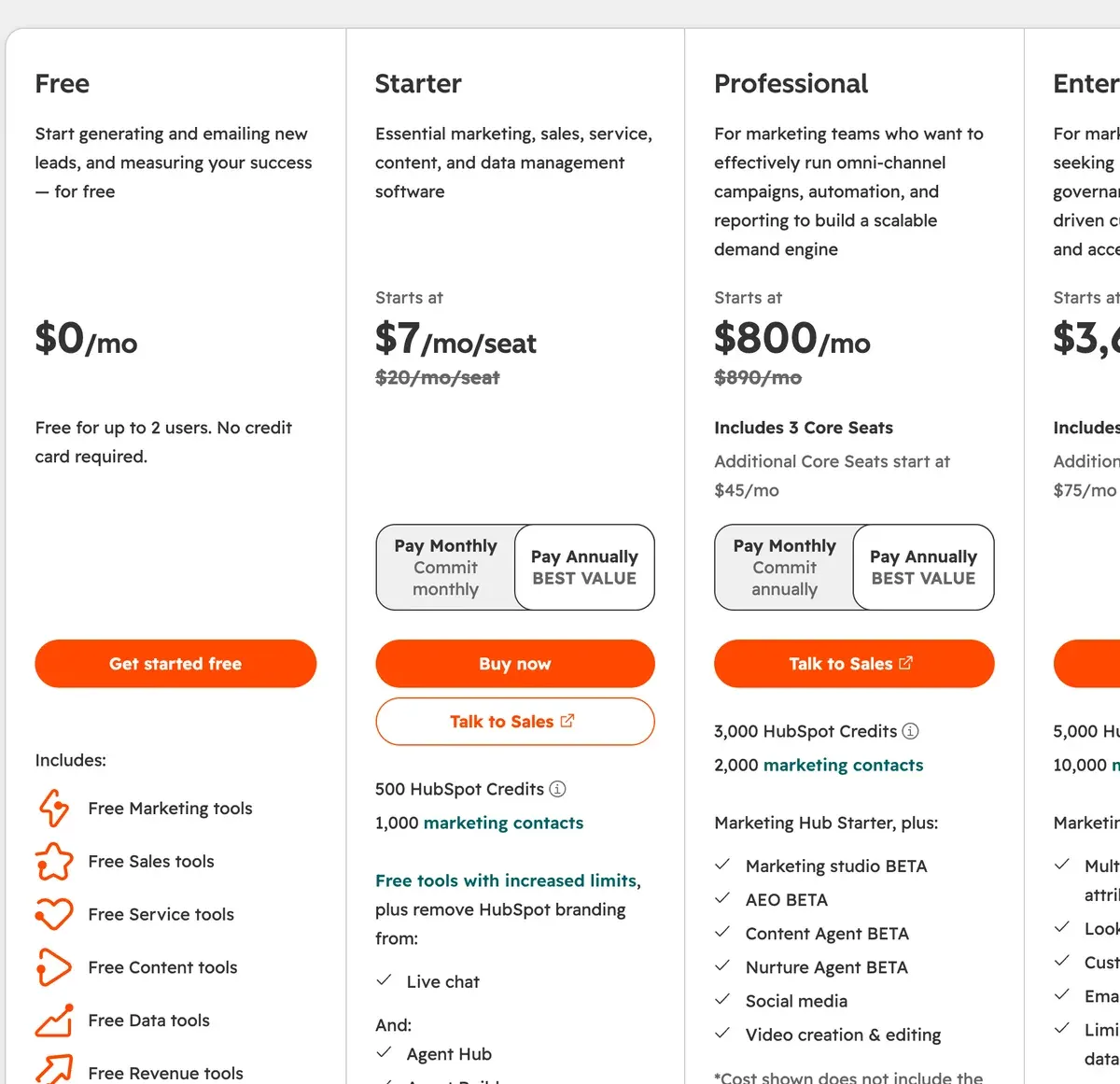
The HubSpot Marketing Hub pricing page prices every contact block and add-on.
Which HubSpot plan has the AI features
HubSpot calls its AI Breeze. The features that touch email sit on different editions, and the catalogue labels most of them Beta.
| Tool | AI feature | Lowest plan | Limits | Checked |
|---|---|---|---|---|
| HubSpot Marketing Hub | Email writing Breeze Assistant (generates content inside the CRM) | Smart CRM (edition marks not readable as text) | The catalogue lists it under Smart CRM as an assistant that can generate content; whether every edition has it was not readable | |
| HubSpot Marketing Hub | Send time Email send time optimization (Beta) | Enterprise | Not on Professional | |
| HubSpot Marketing Hub | AI agent Content agent (Beta) | Professional | Consumes HubSpot Credits (3,000 a month on Professional, 5,000 on Enterprise) | |
| HubSpot Marketing Hub | Personalisation Brand voice / Brand identity (Beta) | not confirmed | Listed as a feature row; plan marks not readable as text | |
| HubSpot Marketing Hub | Other AI email template upload (Beta) | Professional | 100 uploads a month on Professional and Enterprise |
Scroll sideways for all 5 columns
The Content agent writes marketing content and needs Professional. It spends HubSpot Credits, a monthly allowance of AI usage: 3,000 on Professional and 5,000 on Enterprise. AI email template upload, 100 uploads a month, sits on Professional too.
“Email send time optimization”, which picks the hour each contact is most likely to open, is Enterprise only.
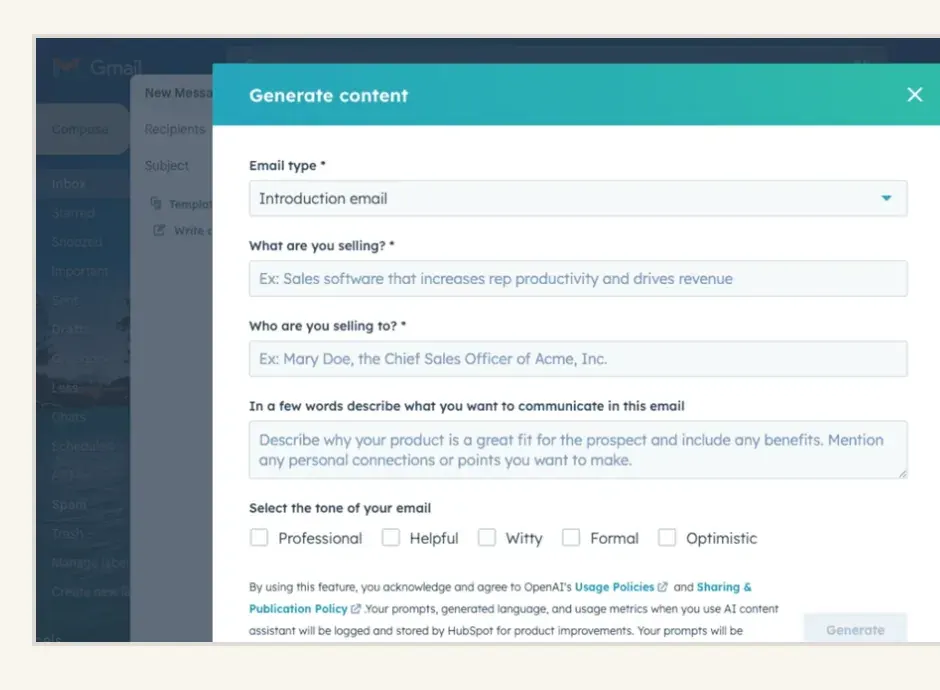
At 10,000 contacts, the Content agent costs $980 a month more than Starter, plus $3,000 once (pricing page).
Does HubSpot train AI on your list
Yes, unless you switch it off. Clause 5.3.1 of the Customer Terms of Service lets HubSpot train its AI models on Customer Data. You opt out in your account settings (terms, last modified 16 September 2026).
Customer Terms of Service, 5.3.1 Machine Learning and AI
We may also use Customer Data to train our AI models in compliance with our obligations under the Agreement. You may opt out of having your Customer Data used for this purpose by updating your settings in your HubSpot account.
| Tool | Trains AI on your data | In plain words | The clause | Terms |
|---|---|---|---|---|
| HubSpot Marketing Hub | Yes, unless you opt out | Customer Terms of Service 5.3.1: HubSpot may use Customer Data to develop and improve its AI features and to train its AI models; you can opt out in your account settings, and opting out does not stop you using AI features. Some AI settings are on by default (Product Specific Terms 7.1). The privacy policy says HubSpot may process personal data to train our AI models. Under 7.6 your AI input and output are shared with third-party AI providers. Opt out: Account settings; the terms point to the knowledge-base article Opt out of HubSpot’s machine learning data use(page not found at the guessed URL, so the exact menu path is unverified). | We may also use Customer Data to train our AI models in compliance with our obligations under the Agreement. You may opt out of having your Customer Data used for this purpose by updating your settings in your HubSpot account.5.3.1 Machine Learning and AI (Customer Terms of Service) | Dated 16 Sep 2026 |
Scroll sideways for all 5 columns
The switch is on by default. HubSpot’s help article puts it under Settings, then AI, then the Access tab, labelled “AI Model Training”. Only a Super Admin can turn it off, and it covers the whole account (help article, updated 8 September 2026).
Understand HubSpot’s AI model training
Super Admins permissions are required to turn off the AI Model Training toggle in your account’s AI settings.
This setting applies at the account level, and covers all eligible customer data.
It is not possible to delete previously used data from trained models. Opt-outs will only apply moving forward.
The opt-out looks forward only: “It is not possible to delete previously used data from trained models.” An admin who minds should switch it off on day one.
Two more clauses matter. Product Specific Terms 7.6 sends your AI input and output to third-party AI providers it does not name. And 7.5 lets you use AI output “for any lawful purpose”, while warning it may not be unique across users (Product Specific Terms). The AI-training guide compares all 15 tools on this point.
Contact counting and deliverability traps
Deliverability is whether your email lands in the inbox or in spam. HubSpot’s own documents set two traps around it.
The first is the one-way contact tier. Pass your tier and you are billed at once. Move contacts back to non-marketing and the change waits for the next month or your renewal; the tier itself cannot drop before renewal (catalogue). So importing an old list “just to look” can lock in a higher bill until renewal.
The second is the send cap. Starter allows sends up to five times your contact tier, Professional ten times and Enterprise twenty. A brand mailing 1,000 contacts twice a week sends about 8,660 emails a month (1,000 times 2 times 4.33 weeks), past Starter’s 5,000 cap.
Two Reddit threads show the setup side. One marketer’s HubSpot emails showed as “unverified” in the new Outlook. The cause was a return-path domain that did not match the sender (Reddit). Another worried about sender reputation before loading 25,000 old B2B signups (Reddit).
What HubSpot reviewers on Trustpilot and Reddit report
The 22 sources are Trustpilot’s 20 latest reviews and 2 Reddit threads, dated 10 September 2025 to 29 October 2026. Trustpilot rates HubSpot as one company, so its reviews mix CRM, sales and support complaints with marketing ones. The page holds 1,179 reviews, 52% of them one star (Trustpilot).
Contracts lead the complaints (7 of 22 sources: Trustpilot). Reviewers describe annual plans that renewed after a missed deadline and charges for services they no longer used.
Slow support comes next (6 of 22 sources: Trustpilot). Then rising costs once seats or add-ons became necessary (5 of 22 sources: Trustpilot).
Praise is thin. One reviewer calls it “Better than other CRMs I have used” and another describes smooth buying and delivery (Trustpilot). One calls its new functions and modules “a bit frustrating” (Trustpilot). None of the 22 discusses the training opt-out.
HubSpot Marketing Hub pros and cons
Pros
- Only marketing contacts are billed; the rest of the CRM stays free (catalogue)
- Block rates published, so any list size can be priced without a sales call
- Free tools send 2,000 emails a calendar month, with HubSpot branding
- Email and sales records sit on one CRM contact record (catalogue)
- One reviewer rates it above other CRMs, another praises smooth buying and delivery (2 of 22 sources: Trustpilot)
- Documented AI-training opt-out in account settings (clause 5.3.1)
Cons
- Auto-renewing contracts and charges for unused services (7 of 22 sources: Trustpilot)
- Slow support passed between teams (6 of 22 sources: Trustpilot)
- Costs climb as seats and add-ons become required (5 of 22 sources: Trustpilot)
- Content agent and AI template upload start on Professional, with required onboarding
- AI training on by default; opting out leaves past use in the models
- Contact tier cannot drop before renewal
How HubSpot compares
ActiveCampaign sells automation by list size too and publishes yearly billing only. Brevo bills by emails sent, which favours a big list mailed rarely. Mailchimp counts unsubscribed contacts in its bill, the opposite of HubSpot’s marketing-contact rule.
AI email marketing tools ranks all of them by what their AI does on each plan. The email price table prices the 15 tools at your own list size.
Questions buyers ask about HubSpot email marketing
Is HubSpot email marketing free?
Yes, within limits. HubSpot’s free tools send 2,000 marketing emails a calendar month with HubSpot branding. Removing the branding and adding automation means Starter or above.
What is a marketing contact in HubSpot?
A contact you mark as one HubSpot may email. You pay for marketing contacts only; non-marketing contacts stay free but cannot receive marketing email.
Does HubSpot use my contacts to train AI?
By default, yes. Clause 5.3.1 allows it, and a Super Admin can switch “AI Model Training” off in the account’s AI settings. Past use stays in the models.
Which HubSpot plan includes AI email writing?
The Content agent (Beta) starts on Marketing Hub Professional. Send time optimisation needs Enterprise.
Every email tool, with its price at your list size, is in the AI email marketing hub
Sources
- HubSpot: HubSpot Marketing Hub pricing, plan cards for Free, Starter, Professional and Enterprise, included contacts and credits, onboarding fees. Checked
- HubSpot: HubSpot Product and Services Catalog, products, list prices, contact block rates, send limits, seats, HubSpot Credits and the AI features by edition. Checked
- HubSpot: HubSpot Product and Services Catalog, free tools, 2,000 email sends a calendar month with HubSpot branding. Checked
- HubSpot: HubSpot Customer Terms of Service, last modified 16 September 2026; clause 5.3.1 on training AI models with Customer Data. Checked
- HubSpot: HubSpot Product Specific Terms, last modified 16 September 2026; section 3 on marketing contacts, sections 7.1 to 7.6 on AI features. Checked
- HubSpot: Understand HubSpot’s AI model training, last updated 8 September 2026; where the AI Model Training switch sits and who can turn it off. Checked
- Trustpilot: HubSpot on Trustpilot, the 20 latest reviews of the whole HubSpot company page, 1,179 reviews in all. Checked
- Reddit: Unverified Sender on Outlook, from HubSpot Emails, r/Emailmarketing thread, 27 July 2026. Checked

Alexandre S.
Alexandre S. is a creative ad strategist and copywriter with ten years' experience in digital marketing across multiple channels.
Related pages
-
 About AI email marketing: the tools, the prices and what the AI does
What AI does inside 15 email marketing tools, the plan that has it, the price at your list size and who trains AI on your list. Checked 1 Nov 2026.
-
 Pricing HubSpot Marketing Hub pricing: what each plan costs from 500 to 50,000 contacts
Starter is $20 a month with 1,000 marketing contacts and $2,010 at 50,000; AI needs Professional. Every tier and add-on, 1 November 2026.
-
 Guide AI features in email marketing tools, plan by plan
Seven AI features across 12 email tools and the lowest plan that includes each, from the official pricing and AI pages read 1 November 2026.
-
 Best list Best AI email marketing tools
Nine email tools priced at 2,500 and 10,000 contacts, the plan that adds each AI feature and who trains AI on your list. Read 1 November 2026.
-
 Profile ActiveCampaign: what it costs at your list size and which plan has the AI
ActiveCampaign bills yearly only. Starter has automations and AI builders; AI email writing starts on Plus. Prices at four list sizes, read 1 November 2026.
-
 Profile Brevo email marketing: billed by emails sent, with Aura AI from Starter
Brevo bills by emails sent: 50,000 contacts mailed monthly cost 56 dollars, weekly 249. AI by plan and the clause 6.7 training terms, checked 1 Nov 2026.


